
You probably didn't open this article because you love the word “CRM.” You opened it because you're stuck between two uncomfortable options: keep limping along with a spreadsheet and a stack of half-remembered follow-ups, or sign up for software that promises to fix everything and might just hand you a new problem — a system with forty features you'll never touch, priced for a sales team you don't have.
Most articles on this subject don't actually answer that question. They answer a different one: “which CRM is best.” That's not what you're asking. You're asking which level of CRM fits a business that looks like yours, and whether you need one at all right now. That's a different question, and it's the one this article will answer.
Here's the direct version, before anything else: the evidence does not support “more features are always better.” The U.S. Small Business Administration, citing CRM analyst Brent Leary, has pointed out that small businesses often underestimate how long CRM implementation takes, and that a lot of what's marketed to them is “more complex and costly” than they actually need (sba.gov, “3 Biggest Problems Implementing a CRM System”). A widely cited study on CRM rollouts found that roughly a third fail, and the reason usually wasn't the software's capability — it was that nobody had defined a clear enough process for the software to support. A bigger CRM doesn't fix that. It just makes the failure more expensive.
This article does three things. It explains, in plain terms, what separates a free CRM, a simple one, and a full-featured one, based on what's included or withheld across products, not marketing language. It walks you through a short, research-based quiz that can tell you “you don't need this yet” or “you might be overbuying” just as easily as it can point you toward a specific tier. And it gives you business situations to check yourself against, without handing you a ranked list of ten products at the end.
What a CRM Does (and Doesn't)
Strip away the marketing and a CRM is three things: a place to store contact and company information, a running history of what happened with each of them, and a way to remember what's supposed to happen next. That's the floor. Pipelines, automation, reporting, and permissions are all layers added on top of that floor — and not every business needs every layer.

Part of the confusion is that “CRM” gets used two different ways. Sometimes it means a sales team's pipeline tool. Sometimes it just means a smarter contacts app — a way to remember that a client mentioned their daughter's graduation in March, so you don't have to ask again in June. Both are legitimate. A solo real estate agent who built a phone dialer that pulls up his Google Contacts notes the instant a client calls isn't running a “sales CRM” in any formal sense, but he's using a working form of one — and it works precisely because it never tried to be more than that.
If your mental image of “CRM” is Salesforce, you're picturing one end of a spectrum, not the definition of the category.
Do You Need a CRM at All?
This is the question most CRM content skips, because most CRM content is written by companies that sell CRMs. Independent sources don't skip it, and when they address it directly, the guidance usually runs the other way: evaluate what you actually need before you evaluate products at all (sba.gov).
There's a useful, non-branded way to test this. Ask whether your current system — spreadsheet, notebook, memory, whatever it is — still reflects reality. Is the process simple enough that everyone involved understands it? Is it clear who owns the next step? Does what's written down still match what's actually happening? If all three hold true, a spreadsheet isn't a stopgap. It's a working system, and there's no evidence-based reason to replace it yet.
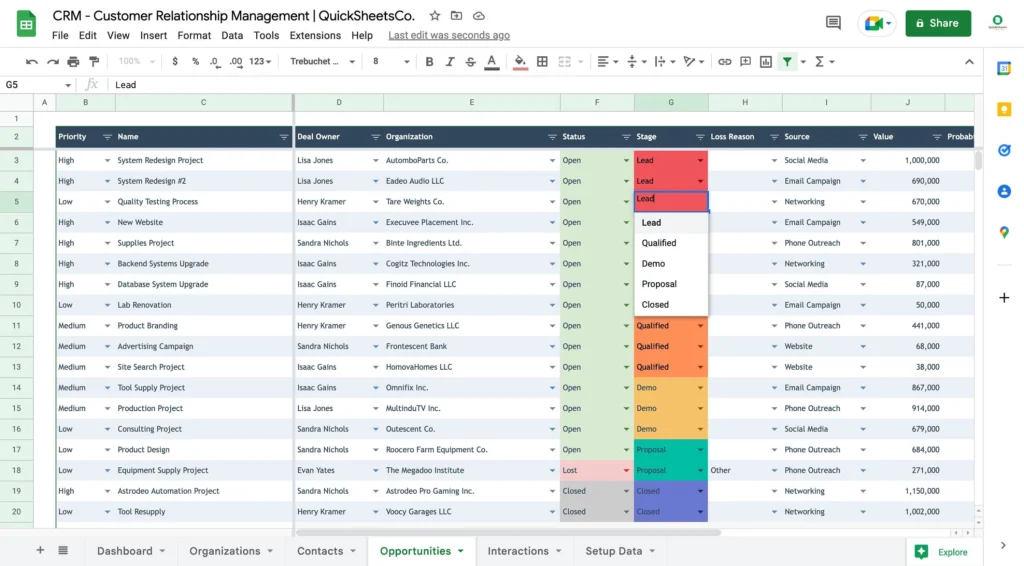
The trouble starts when those things stop being true. That shows up as specific, nameable moments rather than a vague sense that you should be more organized:
- You (or someone else) asks “wait, where did we leave this?” more than once a week.
- A client's history is scattered across an inbox, a notebook, and someone's memory, and reconstructing it takes real time.
- Two people have separately followed up with the same lead — or nobody has.
None of those problems require a CRM by themselves. They require a decision about who owns what and when. A CRM can support that decision once it's made. It can't make the decision for you, and buying one before you've made it is close to the exact pattern independent research keeps finding behind CRM rollouts that get abandoned.
If none of this describes your business yet, the honest answer is that you may not need a CRM right now. Take the quiz below anyway — one of its possible results says exactly that, with the reasoning attached, not just “try again later.”
The Three CRM Levels, Defined by What's In Them
Most CRM comparisons describe tiers with adjectives — “simple,” “powerful,” “robust.” Adjectives don't tell you anything useful. What tells you something is what's included, and, more importantly, what's withheld? We checked official pricing and feature pages for a representative spread of products — HubSpot, Zoho CRM, Pipedrive, monday CRM, Bitrix24, Less Annoying CRM, Freshsales, and Bigin by Zoho — to see what pattern holds across the category as a whole, rather than what any single vendor says about itself.
Free CRM
A free CRM plan reliably gets you contact and deal storage, one pipeline, basic task reminders, and some form of email connection, usually one-way logging rather than full two-way sync. HubSpot's free plan is free forever, not a trial. It covers up to two users and stores 1,000 contacts with no time limit (hubspot.com/pricing/crm). Zoho CRM's free plan covers up to three users at no cost (zoho.com/en-us/crm/zohocrm-pricing.html).
What's reliably missing: workflow automation, custom or scheduled reporting, and API access. Across every product we checked, automation was the single most consistent thing withheld from a free plan — not sometimes absent, but almost always absent.
One thing worth knowing before you assume every CRM has a free option: three of the products we checked, Pipedrive, monday CRM, and Less Annoying CRM, don't offer one at all. Pipedrive and monday give you a time-limited trial instead. Less Annoying CRM skips tiers entirely and sells one flat price with every feature included, a deliberate positioning choice rather than an oversight. A comparison that implies every CRM has a free rung on the ladder is simply inaccurate.
Simple / Lightweight CRM
This is where a business first gets some automation, usually capped rather than unlimited, along with two-way email sync and meeting scheduling. Entry-level paid plans across the products checked sit roughly between $7 and $20 per user per month, though as the pricing section below explains, that number is slipperier than it looks.
Pipedrive's entry paid tier is a useful illustration of what “simple” actually buys you, and what it doesn't. Automation exists, but it's shared across the whole company as one pool rather than per person, and email only syncs one-way until you move up another tier. That's a genuinely different thing than “unlimited automation,” and it's easy to miss if you only read the marketing page instead of the plan comparison table.
Full-Featured / Advanced CRM
This is where role-based permissions, multiple pipelines, forecasting, and unlimited custom fields consistently show up, and where they consistently don't show up below this tier, across every product checked. It's also where marketing automation and support ticketing often turn into separate purchasable add-ons rather than included features, even within one vendor's own product line. HubSpot makes this especially visible: its CRM, Marketing, Sales, and Service functions are sold as separate “Hubs,” so “full-featured” here doesn't necessarily mean “everything bundled.” Sometimes it means “everything is now available to buy.”
What Actually Separates the Levels
The table below reflects what was documented across the products checked. Plan limits change often enough that you should confirm current details on the vendor's own pricing page before making a decision — several of the specific numbers we found had already shifted between when different articles were written about the same product.
Feature | Free | Simple | Full-Featured | Why It Matters |
Contact & pipeline storage | Included, capped | Included, higher caps | Included, unlimited | Present everywhere — not a real differentiator |
Number of pipelines | Usually 1 | Sometimes more | Multiple, often unlimited | A clear sign a business runs more than one distinct kind of work |
Email connection | One-way logging | Two-way sync | Two-way sync, sequences, tracking | The point where email stops being logged and starts being worked from |
Workflow automation | Almost always absent | Present, capped | Present, high or unlimited | The single most consistent free-vs-paid boundary found across products checked |
Reporting | Fixed, non-custom | Custom reports | Forecasting, scheduled analytics | Forecasting needs real deal volume to mean anything — buying the feature doesn't create that volume |
Permissions | None | Basic, if any | Role-based, granular | Matters once more than a couple of people touch the same records |
Custom fields | Single digits | Tens | Unlimited, custom objects | A rough proxy for how specialized your data needs are |
Marketing automation | Absent | Rare, limited | Often a separate paid add-on | Don't assume “full-featured” bundles this in — check per vendor |
What This Costs Right Now
A word of caution before the table: while researching HubSpot's own pricing page directly, we found it displaying two different prices for the same Starter tier at the same time — $7 per seat per month and $20 per seat per month. The $7 figure was explicitly labeled as a limited-time offer for new customers only; $20 is the standing rate (hubspot.com/pricing/crm). That's not a typo we're calling out to embarrass anyone. It's a good, checkable illustration of why a screenshot of a pricing page from six months ago, or a number repeated in a listicle, cannot be trusted at face value. Always check the page.
| CRM | Free Plan | Entry Paid Plan | Key Free-Plan Limitation | What Payment Unlocks |
| HubSpot | $0, 2 users, permanent, 1,000 contacts | $7–$20/seat/mo (Starter; $7 is a limited-time new-customer rate) | No workflow automation at all; 1 branded meeting link | Up to 50 workflows, branding removal, more email sends |
| Zoho CRM | $0, 3 users, permanent | $14/user/mo (annual billing) | Roughly one basic automation rule; fixed, non-custom reports | Multiple pipelines, real automation, custom reports |
| Pipedrive | None — 14-day trial only | $14/user/mo (annual billing, entry tier) | No free tier to compare | Two-way email sync; automation appears at the next tier up, shared company-wide |
| monday CRM | None — 14-day trial only | Roughly $12/user/mo, 3-seat minimum | No free tier to compare | Basic board automation (exact AI/automation scope should be checked live) |
| Bitrix24 | $0, generous user allowance (verify current cap) | Flat fee, not per seat | Storage- and automation-starved rather than user-starved | Automation rules, advanced reporting, telephony |
| Less Annoying CRM | None — single flat price, all features included | One price, everything included | No feature gate exists | Nothing to unlock — that's the entire pitch |
| Freshsales | $0, 3 users, permanent | $9/user/mo (annual billing, Growth tier) | No automation, no built-in dialer | Workflow automation, email tracking, phone dialer |
| Bigin (Zoho) | No separate free tier distinct from Zoho CRM's own | $7/user/mo (Express) | Positioned as the deliberately simplified product itself | More pipelines and customization at higher Bigin tiers |
Two structural points make a flat price-per-month comparison misleading if you read this table without them:
- Not every product has a free tier. Pipedrive, monday CRM, and Less Annoying CRM don't — their listed “entry paid plan” is their floor, not a discounted rung on the same ladder as HubSpot's genuine free tier.
- Per-seat and flat-fee pricing aren't convertible without knowing your team size. Bitrix24's flat fee looks expensive for one person and cheap for twelve; a per-seat product runs the opposite direction. Do the math for your own headcount before comparing numbers across this table.
All figures above were checked against official pricing pages at the time of writing and should be reconfirmed before you commit, since these change (HubSpot's own contradictory Starter pricing, in fact, is proof of how quickly a single page can be inconsistent, let alone how quickly it can change over months).
Signs You're Overbuying
Real, dated user reviews on Capterra and G2 give a useful, if anecdotal, window into what overbuying actually feels like once someone's paying for it. One verified Salesforce Sales Cloud reviewer, who described building CRM systems since 1988, wrote in 2018 that the product “has become too bloated. Small companies just don't need all the functionality and costs,” and specifically named “mission creep” as the failure mode. A separate verified SugarCRM reviewer, the same year, called it “overly complicated to do the simplest tasks.” These are individual reports, not universal facts about either product today, but the pattern they describe — cost and complexity arriving together, and neither one buying you anything you actually use — shows up often enough across unrelated products to take seriously as a real risk, not a rare complaint.
Concrete signs worth checking against your own situation:
- You're paying per seat for people who barely log in.
- Entire sections of the product (forecasting, custom dashboards, advanced permissions) have never been opened.
- Keeping the system running has quietly become somebody's part-time job.
- Your renewal price jumped because of a tier or add-on nobody on the team actually uses.
Signs You're Outgrowing What You Have

The mirror-image problem is just as real, and it tends to show up as one specific, recurring complaint from small teams: someone has to ask two or three people to find out where a single deal or client actually stands. That exact friction — not a headcount number, not a revenue milestone — is the most consistently reported trigger for outgrowing a free or manual system, based on recurring, independently reported small-business discussions.
Other concrete signs:
- Leads are arriving from more than one or two sources, and duplicate or dropped records are starting to show up because nobody's re-entering things consistently.
- Follow-ups are being missed specifically because there are too many to hold in memory, not because anyone's being careless.
- A closed deal's context is getting lost the moment it moves from whoever sold it to whoever delivers it.
The CRM Fit Quiz
This isn't a points-and-total quiz. Every question below maps to something specific the research found, and the logic behind your result is explained afterward, not hidden behind a score. Answer honestly rather than aspirationally — the question that matters most, near the end, isn't about features at all.
1. How many active clients, customers, or open leads are you juggling at once?
a) Fewer than 15 b) 15–75 c) 76–300 d) More than 300
Volume is the clearest, most consistently reported driver of whether memory or a spreadsheet still works, or starts failing.
2. How many people need to see or update this client information?
a) Just me b) 2–3 people who already talk daily c) A small team across different roles d) Multiple teams or departments
This is the variable behind the most commonly reported small-team CRM trigger: needing to ask two or three people just to find out where something stands. It's about fragmentation across people, not headcount by itself.
3. How would you describe your sales or client process today?
a) I don't really have a defined process b) Rough process, mostly in my head c) Documented and consistent d) Split across teams or stages, with a handoff in between
This is the single most evidence-backed caution in the whole research set. Software cannot fix an undefined process, and buying one before defining it is a repeatedly documented cause of abandoned CRM rollouts.
4. From first contact to a closed deal or signed agreement, how long does it usually take?
a) Same conversation b) Days to a few weeks c) One to six-plus months, several touchpoints d) Doesn't really apply — my clients are recurring, not new sales each time
Long, low-volume sales cycles need multi-touch history and reminders, but that alone doesn't mean they need forecasting. Forecasting on too little data produces false confidence, not better decisions.
5. Do you do one consistent type of work, or several genuinely different kinds with different steps?
a) One consistent type of work b) A couple of variations, tracked the same way c) Genuinely different service lines with different steps
Multiple-pipeline need is one of the clearest, most quantifiable boundaries found in official pricing pages: most free tiers hard-cap at a single pipeline, and this is the concrete case where that cap becomes a real constraint.
6. Are your follow-ups mostly custom to each person, or would the same message and timing genuinely apply to many contacts?
a) Every follow-up is basically custom b) Some repeat, but I still write them myself c) The same sequence and timing would genuinely apply to many contacts
Automation absence on free tiers was the single most consistent boundary found across every vendor's pricing structure. Its value depends entirely on repetition, not on how important any one follow-up is.
7. Where do new leads or clients typically come from?
a) One main source (referrals, one channel) b) A couple of sources I check manually c) Several channels feeding in at once
This is independent of team size or deal volume — a solo operator can have this exact problem. Multiple untracked sources are a common cause of duplicate or dropped records.
8. Is your work mostly one-time engagements, or ongoing and recurring after the sale (renewals, retainers, repeat service)?
a) Mostly one-time b) A mix c) Mostly recurring or renewal-based
This one doesn't map cleanly onto Free, Simple, or Full-Featured. It flags whether the shape of pipeline you need (renewal-stage, not just acquisition-stage) matches what a sales-focused CRM tier assumes, regardless of price.
9. Do you currently need to predict future revenue or report pipeline numbers to someone else — a partner, investor, or your own cash-flow planning?
a) No, I mostly just need to know what's happening now b) Occasionally, informally c) Yes, this is a regular, important need
Forecasting bought without enough deal volume or a consistent process behind it tends to produce false confidence rather than a useful number. Your answer to Question 1 should be read alongside this one.
10. Do you need role-based permissions, audit trails, or compliance controls?
a) No, everyone with access can see everything b) Some separation would be nice, not critical c) Yes, this is a real requirement
Permissions were consistently a full-featured-tier-only capability across every product checked, essentially never present below that tier.
11. Realistically, who would set up and maintain this system — adding fields, keeping records updated, training anyone else who uses it?
a) Just me, and I can commit real time to it b) Me, but only if it's fast to set up and needs little upkeep c) Someone on the team can own this as part of their role d) No one has clear ownership of this right now
This is the most evidence-backed question in the entire quiz. Every independent source that examined CRM failure — the Small Business Administration citing analyst Brent Leary, and a widely cited implementation study — converged on ownership and implementation capacity as the dominant failure cause, ahead of price, features, or company size.
12. Be honest: are you considering a CRM mainly because it seems like the professional thing to do, rather than because of a specific problem you're having right now?
a) No, I have a specific problem I'm trying to solve b) Honestly, partly c) Yes, mostly this
Nearly every piece of content telling you “yes, you need a CRM” is written by a company that sells one. This question exists to catch the moment that pressure is doing the deciding instead of an actual problem.
How the result is worked out
This isn't a point total. The logic runs in a fixed order:
- First, check for an override. If you answered low volume, solo access, no defined process, and mostly custom follow-ups, the result is “you may not need a CRM yet,” regardless of anything else.
- If your answers otherwise point toward Full-Featured but you also indicated low-to-moderate volume and an undefined process, the result is “you may be overbuying” instead of a straight tier recommendation.
- If your answers point toward Free but you also indicated team-wide access, a cross-team handoff, or high-repetition follow-ups, the result carries an “outgrowing” caution attached.
- If you answered Question 11 with “no one has clear ownership,” any Full-Featured result is downgraded to Simple, with a note explaining why — because the strongest evidence found says unowned implementations fail regardless of how well the features matched.
- If none of those override conditions apply, your tier is whichever of Free, Simple, or Full-Featured came up most often across Questions 1, 2, 4, 5, 6, 7, 9, and 10. Questions 3, 8, 11, and 12 act as checks and cautions, not as votes toward a tier, which is what keeps the reasoning visible instead of collapsing into a single hidden score.
What Your Result Means
A. Free CRM may be sufficient
Your answers suggest a free plan likely covers what you need right now: low volume, one pipeline, and follow-ups you handle personally rather than in a repeatable sequence. The features free tiers withhold, automation and custom reporting, didn't come up as real needs in your answers. Keep an eye on the outgrowing signs above; if you start needing to ask someone else where a deal stands, that's the moment to revisit this.
B. A simple or lightweight CRM may be a better fit
Your answers put you past the point where a free tier's single pipeline and manual follow-ups hold up, but you haven't described a need for permissions, multiple pipelines, or forecasting. This tier typically includes basic, capped automation and real two-way email sync without the setup overhead a full-featured system assumes you have time for.
C. Full-featured CRM functionality may be worth it
Your answers describe a situation this tier is genuinely built for: multiple pipelines or a cross-team handoff, a real permissions need, and enough deal volume and process consistency for reporting to mean something. One thing worth repeating: this conclusion depends heavily on your answer to Question 11. If nobody has clear ownership of setup and upkeep, the strongest single finding in the underlying research says that even a well-matched full-featured tool tends to fail anyway.
You may not need a CRM yet
Based on your answers, a dedicated CRM may be more system than your current situation calls for. Independent research on this exact question found that businesses at this stage are often equally or better served by a simple notes system, a spreadsheet, or a contacts app with good search, and that adopting a CRM before this point is one of the more commonly documented reasons people abandon one later. This isn't a permanent verdict. It's a description of where things stand today.
You may be overbuying
Some of your answers point toward full-featured functionality, but others describe low volume or an undefined process. The strongest evidence found in this research is that CRM software can't fix a process that hasn't been defined yet, and capability bought ahead of that maturity is a repeatedly documented reason implementations get abandoned. It may be worth defining the process gap first, even if the features themselves would eventually be useful.
You may be outgrowing your current system
Your answers describe problems, team-wide access needs, a handoff between people, or high-repetition follow-ups, that a free or manual system isn't built to solve. The clearest, most consistently reported signal at this stage is needing to ask two or three people just to find out where something stands. That's usually the point worth acting on.
Real Business Situations
These are drawn from researching how the quiz's variables actually play out across common situations. They're offered as reference points to check yourself against, not as a substitute for taking the quiz above.
| Business Situation | Likely CRM Need | Watch For | Often Overkill |
| Solo freelancer, few active clients | None-to-free | Are you forgetting things you were already told? | Pipelines, automation, any team feature |
| Freelancer with many leads and proposals | Free-to-simple | Proposals going stale or getting followed up late | Team permissions, department reporting |
| Consultant with long sales cycles | Simple | Losing track of what was promised mid-cycle | Forecasting — too little volume for it to be reliable |
| Coach running discovery calls | Simple, strong on scheduling | Automated booking and follow-up sequences | Multiple pipelines, custom objects |
| Small agency, several team members | Simple-to-mid | Needing to ask 2–3 people for a deal's status | Multiple pipelines, forecasting (unless volume supports it) |
| Agency with separate sales and delivery teams | Full-featured | Context getting lost in the handoff between teams | Little here is genuinely overkill at this scale |
| Service business with recurring customers | Simple-to-mid, shaped around renewals | Missed or late renewals | Lead scoring, top-of-funnel automation, if not actively prospecting |
| Multiple lead channels feeding in | Depends on volume and team size separately | Duplicate or dropped records from manual re-entry | Assuming this alone means you need a bigger system |
How to Choose After Taking the Quiz
A quiz result narrows the field. It shouldn't be the last step before you pay for anything. This article is built on verified pricing pages and documented product features, not on our own hands-on trial of any specific product, and we want to be direct about that rather than imply otherwise.
Before committing to a plan, spend twenty minutes actually doing the following inside a free trial or free tier, on a specific day, since plan limits and interfaces change often enough that a review from even a year ago may already be out of date:
- Create a handful of real (or realistic) contacts and time how long it actually takes.
- Try to build one pipeline with the stages your work actually goes through.
- Attempt one automation you'd genuinely use, and see whether it's included at the plan you're about to pay for, not a tier above it.
- Connect your actual email account and check whether it's one-way logging or real two-way sync.
- Deliberately try to exceed a documented free-plan limit, such as adding one more custom field than allowed, to see what actually happens rather than assuming.
If a claim about a specific product's current pricing or feature set matters to your decision, check it against that vendor's own pricing page on the day you're deciding. Every specific figure in this article was checked against official sources at the time of writing, but as the HubSpot example above shows, even a vendor's own page can be inconsistent within itself, let alone stable over months.
Common Mistakes
- Buying features before defining the process they're supposed to support. A CRM enforces whatever process you give it; an undefined process just becomes an expensive version of the same chaos.
- Assuming every CRM has a free tier. Several genuinely don't, and treating a trial-only product as if it has a permanent free option leads to comparing the wrong things.
- Ignoring who will actually maintain the system. This is the single most evidence-backed factor in this entire research process, and it's the one most comparison articles never ask about.
- Treating a higher price as proof of a better fit. Several of the strongest, most credible sources found in this research point the opposite direction: mismatched complexity, not missing features, is the more commonly documented reason CRM adoption fails.
Find out CRM vs Client Management Software
FAQ
Do I need a CRM?
Only if your current system is failing in a specific, nameable way, not simply because it feels unprofessional not to have one. See “Do You Need a CRM at All?” above for the concrete signs to check.
Is a free CRM actually enough?
For low volume, a single pipeline, and personally handled follow-ups, yes, based on what free plans reliably include. What they reliably withhold is automation and custom reporting, so if you need either of those, free likely isn't enough.
When do I need a simple CRM instead of free?
When your follow-ups have become repetitive enough that automation would genuinely save time, or when volume has grown past what a single free-tier pipeline can represent clearly.
When do I need a full-featured CRM?
When more than a couple of people need role-based access, when you run genuinely different pipelines for different kinds of work, or when you have enough consistent deal volume for forecasting to produce a real number rather than a guess dressed up as one.
What features actually matter most?
Based on what's consistently gated across products, automation and reporting are the two features that most reliably separate one tier from the next. Nearly everything else (contact storage, tasks, basic email logging) is available at every tier and isn't a useful differentiator.
What should I choose based on my specific business?
Take the quiz above and compare your result against the Real Business Situations table. If your situation doesn't map cleanly onto either, trust the quiz's reasoning over the table, since the table is illustrative and the quiz is built directly from your own answers.
Final Takeaway
The right CRM is the one whose capabilities match your business's actual needs and complexity right now, not the one with the longest feature list. That isn't a marketing line softened for a conclusion. It's the direction the strongest, most independent evidence in this research pointed: the U.S. Small Business Administration's own guidance on this exact problem, a widely cited implementation study, and a recurring pattern in real user reviews all converge on the same point, that mismatched complexity, not missing features, is what actually derails CRM adoption for small businesses.
If your quiz result was Free, that's not a consolation prize. If it was Full-Featured, that's not a finish line. And if it was “you may not need this yet,” that's a legitimate, evidence-backed answer, not a cop-out. The system that fits is the one you'll actually keep using six months from now, not the one that looked most impressive on the pricing page today.