Fifty Upwork proposals no response does not tell you the proposals are bad. It tells you that each of the fifty stopped somewhere. The stopping point could be the job you picked, the position your proposal landed in, the preview a client saw, the way you answered, the interview, or a client who never meant to hire.
Proposal writing is one place to look. It is rarely the only one, and for some freelancers it is the wrong place to start. People who say their Upwork proposals no response can mean no views, no replies, no interviews, or no hire, and each points somewhere different.
The way to find out is to stop counting proposals sent and record where each one stopped. Upwork shows part of this already. Stats and trends marks which of your proposals clients viewed, and Freelancer Plus adds counts, through Proposal insights, of how many proposals on a job the client opened, shortlisted, and messaged.
This article turns that data into six checkpoints, from job selection to hire, with questions to ask at each one before you spend more Connects.
Two limits first. The Upwork documentation reviewed for this article gives no benchmark for any stage, and the figures vendors publish disagree with each other, so there is no agreed “normal” view rate or reply rate to compare yourself against.
You compare yourself with your own earlier batches. And Upwork changes its pages often. The platform facts below were checked in October 2026 and link to their sources where they appear, so confirm anything that affects a decision.
“Nothing” is at least six different problems
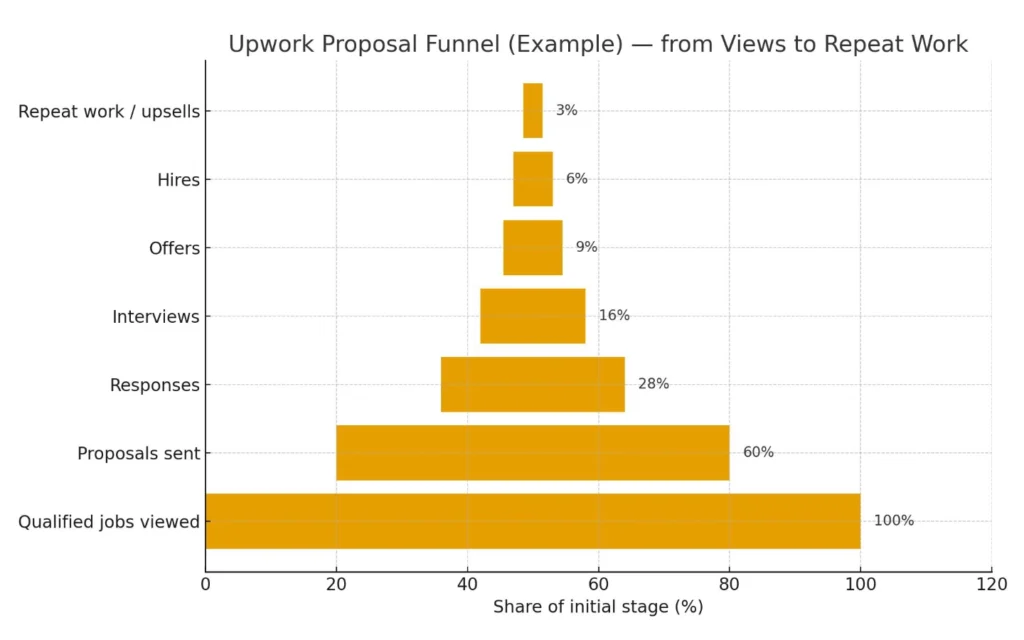
Every proposal moves along the same path, and each step fails for its own reasons:
- Job selection. Whether this job could ever lead to a hire for you.
- Visibility. Whether your proposal reaches the client's attention in the list.
- Open. Whether the client opens it.
- Response. Whether the client messages, shortlists, or invites you.
- Interview. The conversation where fit gets tested.
- Hire. An offer, accepted.
Upwork's client-side help describes the same sequence from the other side: clients review proposals, can shortlist, message, archive, or decline them, and then hire. That article sits in Upwork's enterprise help section, so a smaller client may see a different layout.
Why a count of fifty cannot diagnose anything
Two freelancers can both report fifty proposals and no work while failing at different stages. A single total hides that. The threads below show how different the same “I'm getting nothing” can look once the stages are separated.
| Poster (r/Upwork, age as displayed) | Reported funnel | Where it might point | Why not to generalize |
| Front-end/WordPress developer, new to Upwork (~2 years old) | 68 proposals, 3 viewed, 0 interviews | Possibly stages 2 and 3, since so few were viewed. | The poster shared three letters, but which proposals were viewed is unknown. Commenters disagreed on the cause: rate, letters, or profile. |
| HubSpot/automation freelancer, new account (~2 months old) | 13+ proposals, none viewed, applied within 10 to 15 minutes of posting | Possibly stage 1 or 2. The poster later said only two clients had opened any proposal at all. | Tiny sample and a brand-new account. |
| Poster with three proposals (~2 years old) | 3 sent, 3 viewed, 0 interviews | Possibly stage 4. | Three proposals is too few to say anything. |
| Product designer (~2 years old) | 42 proposals, 18 viewed, 8 interviews, 3 hires, about $200 in Connects | A full funnel, with every stage present. | A success post. The account was an older one reactivated, and it reached Top Rated that same month. The poster credits being selective. |
| Commenter in that thread | 40 proposals, 17 viewed, 7 interviews, 3 hires | A full funnel. | Only one of the three hires came from a proposal. Two came from clients who contacted the freelancer. |
| Top Rated full-stack developer, 60K+ earned, 100% JSS (~2 years old) | 200+ proposals in a month, no job | Unclear. The poster found that clients on 100 jobs he had applied to had barely hired. | One account. It suggests badges do not guarantee results. |
Posters in these threads describe getting a first win after anywhere from about 20 or 30 proposals to more than 400. The range comes from different niches, account ages, and luck. None of it is a target to aim for or a limit to stop at.
Is there a normal Upwork response rate?
The Upwork documentation reviewed for this article gives no benchmark for view, reply, interview, or hire rates.
Vendor guides do publish figures, and they disagree. One vendor's response-rate page lists a 15% platform average for 2025. Another vendor calls a 10% to 15% reply rate solid. A third says outright that Upwork publishes no official benchmark and offers its ranges only as a diagnostic aid. These figures come from vendor sites, not from Upwork, so none can be checked against Upwork's own data.
A rate only helps if you know what it counts. The number this article relies on is your own reply rate among viewed proposals, tracked batch by batch in the log below, because you can see what sits behind it.
What Upwork lets you see, and where the numbers mislead
Your two sources of data
- Stats and trends shows which proposals clients viewed, how many times, and when.
- Proposal insights is part of Freelancer Plus ($19.99 a month, which also includes 100 Connects a month, against 10 on the Basic plan). For a job you applied to, it shows how many of that job's proposals the client opened, shortlisted, and messaged.
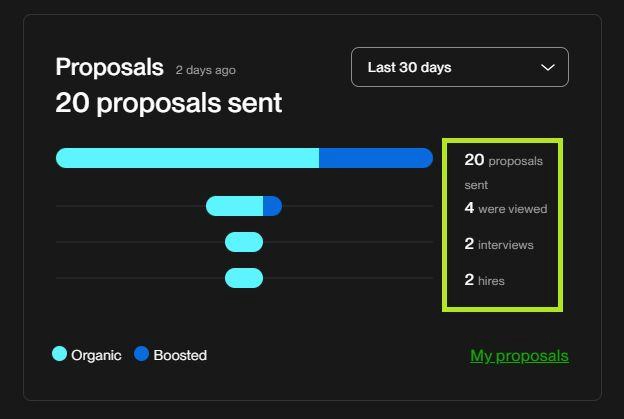
- My Stats compares your organic and boosted proposals on views, interviews, and hires.
- Without Plus you cannot see whether the client opened anyone else's proposal. That makes it harder to tell a dead job (stage 1) from a proposal that was passed over (stages 2 and 3). It is worth knowing that before deciding what the data means.
Why the numbers disagree
- The proposal count on a job page includes replied invitations and leaves out withdrawn, declined, and archived proposals. Insights counts organic proposals only. A mismatch between the two is by design.
- Upwork's own boost rules separate a client opening a proposal from seeing it: boosted status ends after the client has opened it three times or seen it five times without acting.
- Stats and trends does not say which of those events counts as “viewed.” Read a view as “the client did something with it,” not “the client read it.”
- Posters say some clients open a freelancer's profile without opening the proposal. One poster said a client interviewed them while the stats showed zero interviews. Both are single accounts, and neither is confirmed by Upwork.
What a client sees before opening your proposal
| When | What the client sees | Do you control it? |
| Before opening | Your profile picture, name, title, hourly rate, Job Success Score, talent badges, and the opening lines of your cover letter. | Photo, title, rate, and opening lines: yes. JSS and badges: only over time. |
| How much of the letter | Only the first couple of sentences. Upwork gives no character count. | Yes, but you cannot know exactly where it cuts off on every screen. |
| After opening | The rest of the cover letter, your bid terms, and your answers to the client's screening questions. | Yes. |
| On your profile | Work history, reviews, portfolio items, and skills that best match the job are highlighted first. Specialized Profiles ended on May 28, 2026. | Partly. What is highlighted depends on what your profile contains. |
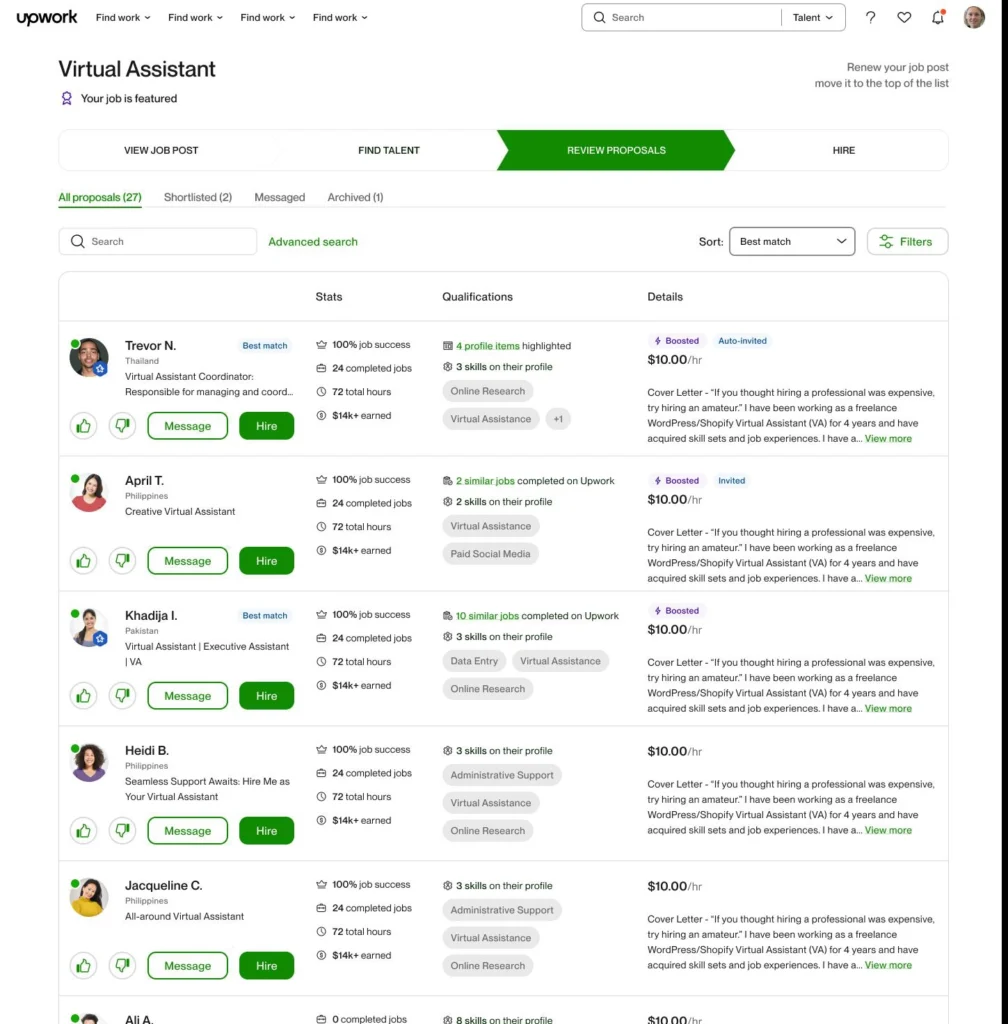
Older Upwork pages and some screenshots online list more preview fields, such as completed jobs, hours, and earnings. The 2026 guide lists the shorter set above, so check how your own proposals appear before assuming anything about what clients see.
Build a proposal log

The diagnosis only works if you record the same things for every proposal. Start with the last fifty if your history allows it. Do not skip the job-outcome column; it needs a second visit a few days later.
| Column | Where it comes from | What it answers |
| Job link, category, age at submission | Job page | Timing and category effects |
| Client signals: hire rate, payment verification, reviews, and jobs posted (see Upwork's guide to fake posts) | Job page | Was this client likely to hire at all? |
| Proposals range and interviewing activity when you applied | Job page | How crowded was it, and was the client engaged? |
| Your rate against the posted budget | Proposal | Did price put you lower in the list? |
| Boosted? Connects spent | Proposal | Cost, and organic vs. boosted results |
| Screening questions answered; code word or other instruction followed | Proposal | Did you pass the “did you read it” tests? |
| Viewed? How many times? When? | Stats and trends | Stage 3 outcome |
| Did the client open, shortlist, or message anyone else? | Proposal insights (Plus only) | Was the client active? |
| Reply, interview, hire, and dates | Your messages | Stages 4 to 6 |
| Job outcome: hired anyone, closed, or expired | Revisit the job later | Stage 1 and Connects refunds |
| What you changed since the last batch | Your note | Cause vs. coincidence |
Log invitations separately. Responding to an invitation costs no Connects, and Upwork's wording is that an invitation means something about your profile caught the client's attention. Insights does not count them with organic proposals.
The routing question: find the earliest stage where proposals stop
- Was the client active on this job? Look at hire history, interviewing activity, and, with Plus, whether the client opened anyone's proposal. If the answer is no or unknown across many jobs, start at stage 1.
- Active client, but your proposal was not viewed? Stage 2 or 3. If you applied late, matched weakly, or sat below the boosted slots, suspect stage 2. If your proposal was placed prominently (for instance boosted) and still went unopened, suspect stage 3. Upwork does not confirm placement, so treat this split as a hypothesis.
- Viewed, but no reply? Stage 4.
- Replies, but no interviews? Stage 5.
- Interviews, but no hire? Stage 6.
Fix the earliest failing stage first. A later-stage result tells you little while an earlier stage is blocking everything.
| Stage | What it looks like | First thing to check |
| 1. Job selection | Jobs end unhired or unopened | Client hire rate, activity, budget fit |
| 2. Visibility | Client active; your proposal unseen | Timing, match, rate vs. budget, availability |
| 3. Open | Others opened; yours not | Preview: photo, title, rate, JSS, opening lines |
| 4. Response | Viewed; no reply | Screening answers, evidence for each requirement, price clarity |
| 5. Interview | Replies; no interviews | Are the replies real? How fast do you answer? |
| 6. Hire | Interviews; no hire | Price and scope, depth of experience, whether anyone was hired |
Stage 1: Job selection

What it looks like
Jobs in your log end without a hire. The client shows few or no hires, the job gets reposted, or, where you can check, nobody's proposals were opened.
What can cause it
- Upwork's guidance on fake and dead posts lists several warning signs: no hire rate shown, a low hire rate alongside many jobs posted, several listings without hires, and long stretches with no interviewing or hiring. A client's hire rate is how often they hire after posting a job.
- Upwork's Connects guidance tells freelancers to check whether the client has hired and how many hires they plan, and says many proposals or ongoing interviews can lower your chances.
- One poster described a client who posted the same job five times at a 25-Connect minimum and never interviewed anyone. A poster whose 50 proposals went unopened quoted an Upwork support reply saying the client closed the job without opening them. That quote is unverified.
- Posters disagree about low budgets. Several call $5 to $10 fixed-price jobs placeholders. One said they negotiated a higher rate on a low-budget job that read like a real brief. A thread screenshot shows a $10 fixed-price job to extract data from 140 receipts with 20 to 50 proposals 33 minutes after posting.
- No single signal proves a job is dead. A budget far below the scope, a one-line brief, an unverified payment method, and a client with no history each have innocent explanations. Evidence adds up in combination, and no source tests which combinations predict a hire.
Four labels for a job
These categories are this article's, not Upwork's. A job can be a good fit, crowded, and low quality all at once, so treat them as separate questions.
| Label | Evidence that points to it |
| Good fit | Your profile already contains the job's required skills and relevant work, since matching uses keywords, skills, experience, and work history. The posted budget overlaps your rate. The scope sits inside your experience. |
| Weak fit | Required skills are missing from your profile. The budget is outside your range, and Upwork lists out-of-budget proposals lower. The stated experience level is above what you can show. Hours or availability do not match. |
| High competition | A large proposals range on the job page. A high Connects cost, which Upwork says reflects size, scope, interest, and market trends. Posters report proposals piling up within minutes in crowded categories. |
| Possibly low-quality | The warning signs Upwork lists, plus things posters report: vague or templated posts, a budget out of line with the scope, reposts, requests to leave the platform. None of these proves a dead job. |
What to check before you apply
- Does the client show any hires, and what is their hire rate?
- Is anyone being interviewed or hired?
- With Plus: has the client opened any proposals?
- How old is the job, and has anything happened on it since it was posted?
- Does your profile contain the job's required skills? Does the budget cover your rate?
- Has the client posted similar jobs before without hiring?
What you can change, and what you cannot
Change: which jobs you apply to, how many signals you require, and how closely the job matches your skills and budget. Cannot control: whether the client intends to hire, abandoned or ghost posts, other applicants, or the Connects price, which Upwork says can change while a job is live.
Metric to watch
The share of your proposals that went to jobs where the client eventually hired anyone, split by category and by the signals you used. Compare batches against each other.
Stage 2: Visibility
What it looks like
The client was active, because they opened or interviewed others, but your proposal was not viewed. Without Plus, you may only see low view counts across jobs whose signals looked fine.
What can cause it
- Upwork compares your proposal and profile with the job using keywords, skills, experience, and work history, and shows the closest matches first. It does not publish the weights.
- On jobs with many proposals, clients may not reach all of them. Upwork says applying early and to best-match jobs improves your chances, and gives no figure.
- Proposals outside the client's budget range are listed lower, and an availability setting of “None” can affect whether clients see your proposals.
- Boosted proposals take four slots above the organic list.
- Specialized Profiles ended on May 28, 2026. Proposals sent from them stayed visible to clients until June 28, and each profile now highlights the relevant work for each job. Advice written before that may refer to a feature that no longer exists.
Timing: what the evidence supports
- Reports conflict. One freelancer applies within the hour and checks client activity. Another recommends the first 30 minutes. One client said he did not look at proposals for the first couple of days, and another said he stops reading around day 3 or 4 unless the role is specialized. A highly experienced freelancer said skilled work often hires slowly.
- A new account applied within 10 to 15 minutes of posting and got no views. Another poster applied within five minutes to jobs with fewer than five proposals, and all three were viewed, with no interviews.
- In one vendor's dataset of agency pipelines (about 59,000 proposals with timestamps), replies were highest for proposals sent in the first few minutes, lower afterward, and rose again around 12 to 15 minutes. The data measures replies, not views. Early bidders there are partly those with scanning tools, and the vendor's explanation for the rebound is a guess.
- Timing is a variable to test in your own log. It is not a rule, and nothing here supports “apply within X minutes.”
A second path to being seen
Upwork's May 2026 update says Uma Recruiter shortlisting is now available on the Basic plan. Upwork's blog post on building Uma Recruiter says it evaluates incoming proposals against the client's requirements, including the proposal text and answers to screening questions. The sources reviewed do not say how often clients use it. For clients who do, a shortlist may be what they look at first, so your profile and screening answers could matter even when your preview never gets a click.
What to check
- How long after posting did you apply, and how many proposals did the job already have?
- With Plus: had the client opened others by then?
- Does your profile contain the job's skills? Is your rate inside the budget? Is your availability set honestly?
- Did you boost? Compare organic and boosted results in My Stats.
What you can change, and what you cannot
Change: profile keywords and skills, availability, rate against budget, which jobs you take, how soon you apply (custom job alerts come with Freelancer Plus), and whether you boost. Cannot control: other freelancers' boosts and volume, the ranking weights, how a client sorts the list, or whether the client uses a shortlist.
Metric to watch
Among jobs where the client was active, the share of your proposals viewed, split by when you applied and by organic vs. boosted.
Stage 3: Open (proposal views)
What it looks like
The client opened other proposals and not yours, or views stay low on jobs where you fit well and clients are active.
What can cause it
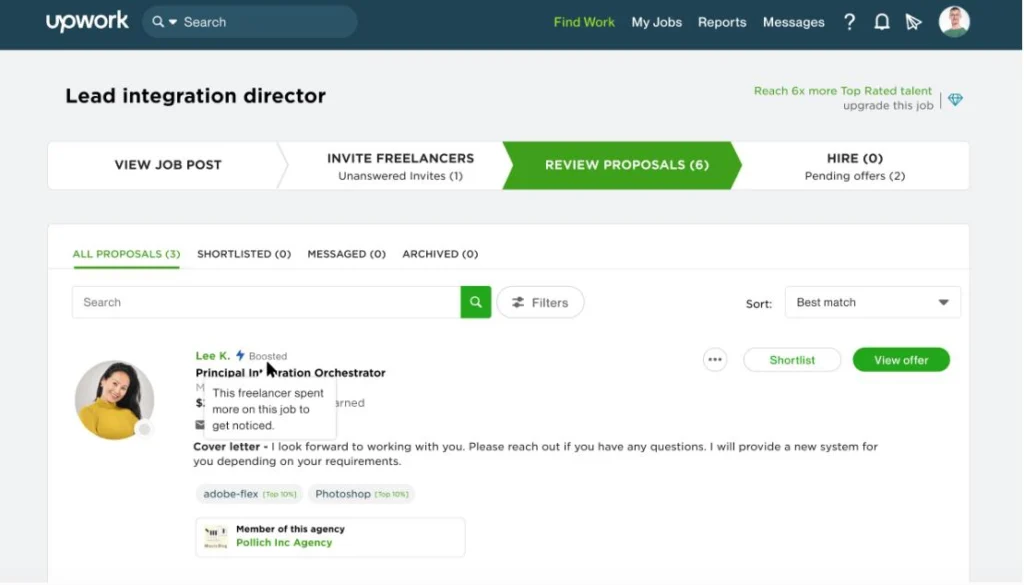
- Before opening, clients see your photo, name, title, rate, JSS, badges, and the opening lines of your letter. Upwork says only the first couple of sentences show.
- A JSS appears only after two or more contract outcomes within 24 months, with outcomes from two or more clients. It is calculated daily over 6-, 12-, and 24-month windows, and the best score is shown. Top Rated requires at least 90%.
- For a new account, most of the signals in that preview are empty by definition. What a new freelancer controls is the photo, title, rate, and first sentences. Established freelancers have other signals, yet the Top Rated posters above still report no views, so badges alone do not guarantee opens.
- In the WordPress poster's thread, commenters offered competing explanations: the rate was too low, the letters said nothing specific, the profile was thin, the greeting was weak. All opinion, none tested.
- You can edit the whole proposal for six hours or until the client views it. After that you can change terms only.
What to check
- Look at your own profile as a stranger would: is the photo clear, does the title say what you do, is the rate sensible for the jobs you target?
- Compare the opening lines of your viewed and unviewed proposals. Look for the same pattern across several before drawing a conclusion.
- Compare your rate with the posted budget on each.
- On unviewed proposals, with Plus: did the client open others?
What you can change, and what you cannot
Change: photo, title, rate, and the first sentences. Cannot control in the short term: JSS, badges, completed jobs, how other applicants' previews look, or how a client browses.
If you withdraw a proposal, the Connects are not refunded. Upwork's withdrawal page limits resubmitting to the same job to proposals that were not boosted and did not involve an Uma video interview.
Metric to watch
View rate on active-client jobs, plus a one-line reason for each unviewed proposal.
Stage 4: Upwork Proposals No Response

What it looks like
Clients viewed your proposal, maybe more than once, but nobody messaged, shortlisted, or invited you.
What can cause it
- Upwork recommends opening with the client's needs, including relevant work or results, keeping the letter to two or three short paragraphs, and ending with a clear next step. It lists generic cover letters as a top reason for non-views and notes that some clients ask for a code word at the top of the proposal.
- Upwork's terms prohibit misrepresenting your experience or skills, and say Upwork does not independently verify freelancer profiles.
- A client who asked applicants to list requirements they could prove experience with said only 10 to 15 of about 30 did. Another said near-identical answers to his screening question made it impossible to qualify anyone who had not read the post. A third said he skims first for proposals that look manually written or are strong matches.
- Several posters who say they wrote custom proposals still report no replies, including the WordPress poster and one with about 105 tailored proposals and no hires. That suggests tailoring is not enough on its own.
- Personalization shows a client you read the post. It is unlikely to make up for a client who is not deciding, a rate outside the budget, or evidence the client cannot check.
- Because Uma's evaluation reads screening answers, skipping them probably costs you with clients who use it. The sources do not show how the answers are weighted.
How to separate a passed-over proposal from a client who is not deciding
If Insights shows the client messaged or shortlisted others and not you, look at your proposal and evidence. If nobody got a response, the client may not be deciding yet, and the proposal may not be the cause.
What to check
- Did you answer every screening question with something specific to this job?
- Did you follow any instruction or code word in the post?
- For each requirement the client stated, did you point to something they could verify?
- Was your price within the budget, and was it clear what it covered?
- Does every claim match what your profile shows?
- Has the client messaged or shortlisted anyone?
What you can change, and what you cannot
Change: how specifically you answer, the evidence you show for each requirement, how clearly you state price and scope, and how honestly you describe your experience. Cannot control: when the client decides, how strong the other applicants are, or how Uma ranks proposals.
Metric to watch
Reply rate among viewed proposals, by job type, and how long clients take to reply.
Stage 5: Interview (replies but no interviews)

What it looks like
You get replies, but they do not become interviews, or conversations stall.
What can cause it
- Three posters reported replies that looked like scams or tried to move them off the platform. One was told to join a Telegram chat to transcribe images for pay. Another was blocked minutes after arranging a meeting. These are individual reports, and Upwork's prevalence is unknown.
- Upwork says it matches clients with responsive, active freelancers. Some job posts also require a video interview with Uma in place of a cover letter.
- Upwork's trust and safety rules do not allow free work.
- Other possible causes, which are hypotheses and not findings, include a mismatch in availability or time zone that shows up in the reply, slow answers to the client's questions, and a client who is gathering quotes and never intended to interview.
What to check
- Does the reply ask you to leave the platform, work for free, or click an outside link?
- How quickly did you answer?
- Did you complete any requested video interview?
- Does your availability setting match what the client needs?
What you can change, and what you cannot
Change: your response speed, how clearly you state scope, rate, and availability, and whether you stay on the platform. Cannot control: client ghosting, scam outreach, or the client's timing.
Metric to watch
The share of replies that become interviews, the share that look legitimate, and your own response time.
Stage 6: Hire (interviews but no hire)
What it looks like
You interview and still do not get the job.
What can cause it
- Hire rate exists as a client metric because some jobs end without a hire. Upwork's terms require you to perform consistently with the experience you represent in your profile, proposals, and conversations.
- A client in one thread said he chose an agency whose quote was 4% lower than the freelancer he had interviewed. Another said he hired a freelancer whose approach read as human, who offered a video or phone call, and who later proposed extras, and he ended up tripling his budget, from about $1,000 to $3,000. Each is one client's account.
- Plausible reasons include price or scope disagreements that surface in conversation, an interview that shows less depth than the proposal implied, communication concerns, a stronger competitor, or no hire at all.
What to check
- What happened to the job: was anyone hired, and was it closed or left to expire?
- Did the client give a reason? Record it.
- Did your quote fit the budget, and did you say what it covered?
- Did your answers match what your profile claims?
What you can change, and what you cannot
Change: clarity on scope and price, preparation for questions, accuracy about your experience, and over time your reviews and proof. Cannot control: whether the client hires at all, other candidates, or the client's budget ceiling.
Metric to watch
Interview-to-hire, plus a recorded reason for every loss and whether the job ended in a hire for anyone.
Boosting: what it can and cannot fix
- A boost places your proposal in one of four slots at the top of the client's list with a “Boosted” icon. Eligibility depends on how strong a match you are for the job. Boosting is optional, and clients receive your proposal either way.
- Boost auctions run seven days or until the first hire. You pay your bid if you are in the top four when the auction ends, or if the client interacts while you are boosted. If you are pushed out without any client interaction, the extra Connects are refunded, but the base Connects never are.
- On a small share of jobs, Upwork runs “placebo” auctions. Freelancers can still place boosts, but no Connects are taken for them, clients receive all proposals, and none are labeled boosted.
- Upwork's boost page says boosted proposals are 17% more likely to be seen and that boosting raises the chance of being hired by up to 24%. It also says boosting does not guarantee a click. That page is about 14 months old, and none of these figures comes with a baseline or method.
- A new account boosted every proposal and got no response. A Top Rated freelancer reported that boosting did not help. One client said the “Boosted” label means nothing to him.
- A boost changes your position in the list. It does not change a client's intent, a poor fit, or a dead job. Use My Stats to compare your own organic and boosted results before treating a boost as a fix.
What failure costs: Connects

Connects cost $0.15 each. The number a proposal needs varies by job, appears on the job post, and can change while the job is live. Upwork publishes no range. Unused Connects expire one year after they are earned or bought.
| Refunded | Not refunded |
| A client cancels the project before a contract is made. Upwork removes the post for a terms violation. Boost Connects, if you are knocked out of the top four without any client interaction. | A client rejects your proposal. A client picks someone else. The job expires without a hire. You withdraw. The base Connects, even when boost Connects come back. |
The refund rules in this table come from Upwork's Connects page and its boost page.
Upwork's Help Center says “cancels” and some community replies say “closes.” The sources do not say whether an expired post is ever treated as closed, so do not assume a refund. Posters report paying from about 8 to around 30 Connects per proposal. One described applying to ten jobs a day at 25 Connects each, which comes to $37.50 a day. Those figures are self-reported, and the point is simply that blind volume costs real money when most failures lose the base Connects.
Where the advice contradicts itself
Common rules circulate in these threads. The evidence supports none of them as a rule, and the table shows why.
| Topic | One view | The opposite view | What the evidence supports |
| Timing | Apply in the first minutes or the first hour | Clients of skilled work do not look for days | Upwork says early improves chances without a number. Vendor data shows an early reply advantage that is not smooth. Test it in your log. |
| Invitations | Invited freelancers outrank everyone | Clients click suggested profiles without care | Invitations cost no Connects. No source reviewed shows invited freelancers outrank applicants. |
| Boosting | You have to boost to be seen | Clients ignore the label | Four paid slots exist and boosting is optional. Effect claims have no baseline. |
| New clients | Avoid them; they are often scams | New clients are the best | Hire rate only exists with history. No source tests either view. |
| Rate | Raise it so you look serious | Lower it to compete | Upwork says out-of-budget proposals are listed lower, and rates far below or above average can send the wrong signal. |
| Questions in the opening | Ask one to show knowledge | Never ask in the first line | Upwork says ask only questions that show understanding. The rest is opinion. |
| AI-written proposals | Fine if you edit them | Clients can tell and dislike it | Upwork promotes its own AI assistant for drafting and proofreading. Clients describe generic, near-identical answers. Upwork's rule on automated submission was not verified here, so check it before using any tool that submits for you. |
When the problem is not your proposal
Your log may point away from your writing. If your Upwork proposals get no response, check where they stop before rewriting every proposal. Three patterns would say so:
- Most rows show clients with no hires, no interviews, and no opened proposals. Better wording cannot fix that. Selecting different jobs can.
- Views are fine, but clients who viewed you also did not message or shortlist anyone. The client may not be deciding yet.
- Replies keep turning out to be off-platform requests or scams. That is a filtering problem for your replies, not a proposal problem.
If most of your losses sit at stages you do not control, whether to keep applying on Upwork is a business decision this article cannot make for you. The data in your log is the best input for it.
Reading a log: an illustration
The rows below are invented for illustration. They are not real data and carry no rates. They show how one proposal each lands at a different stage.
| Job | Client signals and activity | What happened | Where it points |
| A | Hire rate shown, two hires on record, four people being interviewed. Insights: client opened many proposals. | Applied after the job had been up a while. Not viewed. | Stage 2 or 3, because the client was active and yours was passed over or never reached. |
| B | No hire rate, no interviewing, Insights shows zero proposals opened by anyone. | Not viewed. | Stage 1, because nobody's proposal was opened. This is the job, not the proposal. |
| C | Client messaged two other applicants. | Viewed twice, no reply. | Stage 4. Look at screening answers, evidence, and price. |
| D | Normal-looking client. | Reply asks you to continue on Telegram. | Stage 5, as a legitimacy problem. |
| E | Interview happened. | Client hired someone else, no reason given. | Stage 6. Reason unknown, so log it as unknown. |
| F | Active client. Insights: client opened no proposals at all. | Viewed once, no reply. | Probably the client, not you. Be careful before blaming the writing. |
One row proves nothing. You are looking for the stage where most rows cluster. Without Plus, mark client-activity cells “unknown.” If many cells are unknown, change what you record before you change how you write.
Before you send proposal 51

Job-selection checklist
- Client shows a hire rate and some history, or you have a reason to take the risk.
- Someone is being interviewed or hired, or the job is recent enough that a client could still be deciding.
- The budget covers your rate, and the scope fits the experience level you can show.
- Your profile contains the job's required skills.
- The post is clear enough that you can say what you would deliver.
- The client has not reposted this job repeatedly without hiring.
- You have checked what the Connects cost will be, because it can change while the job is live.
Proposal checklist
- You read the whole post, followed any instruction or code word, and answered every screening question specifically.
- The first couple of sentences refer to this client's actual need, since that is all that shows in the list.
- You pointed to relevant work or results the client can check.
- Your price is inside the budget, and it is clear what it covers.
- Every claim matches what your profile shows, since Upwork's terms prohibit misrepresenting experience.
- You have a clear next step.
- You recorded the job's signals in your log.
Your action plan
- Reconstruct your last batch. Fill in the log from Stats and trends, your messages, and the jobs' current status.
- Label each proposal by the stage where it stopped. Use the routing question. Allow “unknown.”
- Find where losses cluster. If one stage holds most of them, work there first. If the data cannot decide, write that down.
- If stage 1 dominates, change job selection before anything else.
- Change one variable per batch. Pick one: job filters, rate against budget, availability, your photo, title, or opening lines, or screening answers. Write down which.
- Decide the size of your next batch in advance. No source says how many proposals are enough, so choose a number that fits your budget and compare it with your earlier batch, not with a published norm.
- Revisit every job a few days later. Record whether anyone was hired, and check whether any Connects are refundable.
Before proposal 51, if your Upwork proposals get no response, you should be able to answer: At which stage did most of my last proposals stop? Was the client active on those jobs? How did my preview compare with the proposals the client did open? What did I change last time, and what happened?