This is part of our guide to the best client management software for small business. For deep-dive reviews of each tool, see our complete tool reviews. Still deciding between a CRM and an all-in-one platform? Read our CRM vs client management software comparison first.
Most setup guides skip the most important question: which problem are you actually solving?
Before you touch any tool, answer this: is your biggest pain right now finding and closing clients, or delivering work and getting paid?
That answer determines which path to follow. Starting on the wrong one means a week of configuration that doesn't fix your actual problem. If you're still unsure which category fits, read our CRM vs client management software all-in-one comparison before continuing here.
Path 1: Setting Up a CRM (HubSpot, Pipedrive, Freshsales, Bigin, or Less Annoying CRM)
This path is for you if: leads are going cold, follow-ups are being missed, or you can't see your pipeline clearly.
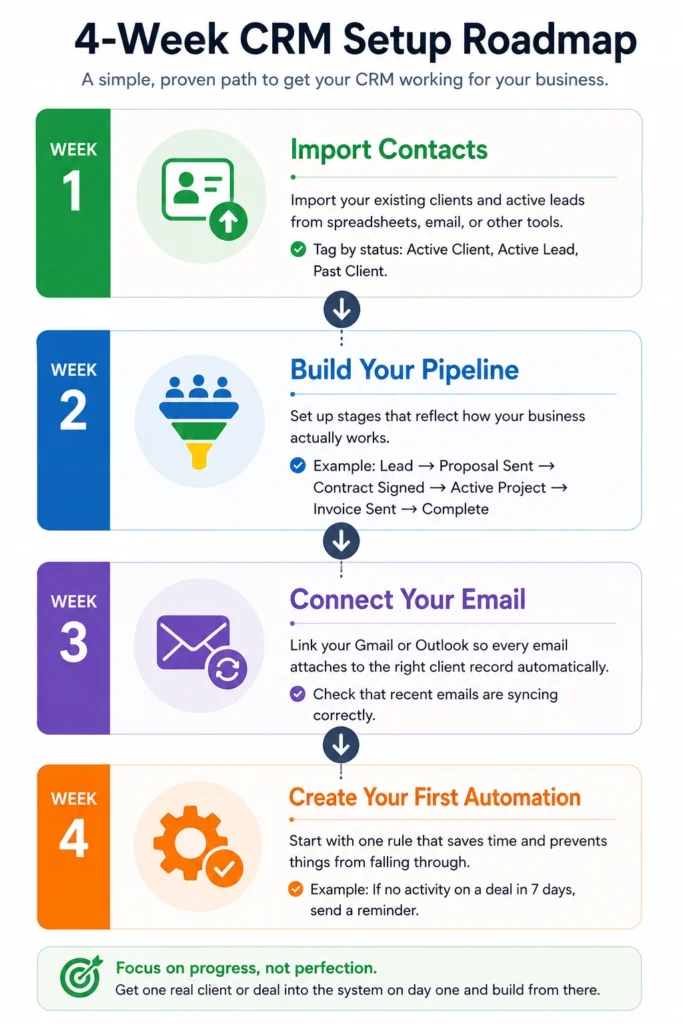
The most common setup mistake: trying to configure every feature before using the tool with a real client. Most people spend three days building what feels like the perfect CRM system and walk away by week two because it never connected to real work. Get one real client or deal into the system on day one. Build around actual usage from there.
Week 1: Import your contacts and active deals
Import your existing clients and active leads from wherever they currently live — spreadsheet, inbox, or a folder of business cards you haven't touched since 2022. Every tool on this list supports CSV import. For a list under 500 contacts, this takes under 30 minutes.
Two things matter here:
Import only active clients and current leads first. Don't spend three hours cleaning five years of contacts before you've used the tool once. Past clients and dead leads can wait.
Tag contacts by status immediately: Active Client, Active Lead, Past Client. One tagging step makes your first week dramatically more useful. You can filter to what actually matters today instead of scrolling through everyone you've ever met.
Week 2: Build your pipeline stages
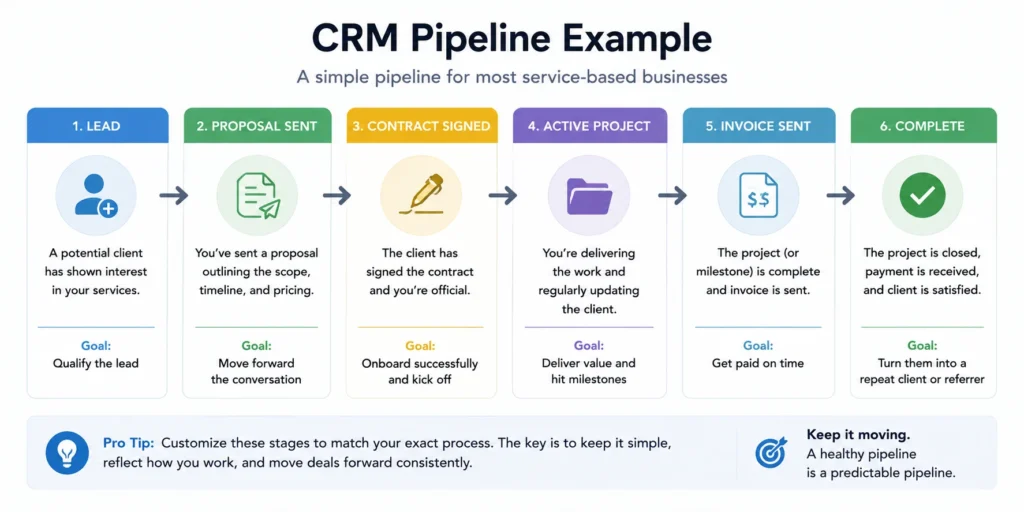
Set up stages that reflect how your business actually works, not the default labels the tool suggests.
For most service businesses, something like this holds up in practice:
Lead > Proposal Sent > Contract Signed > Active Project > Invoice Sent > Complete
Rename every default stage before you add a single deal. A pipeline that doesn't mirror how you think about your work gets ignored within two weeks. If you call a signed client an “Active Project” rather than “Closed Won,” change it now. Small friction becomes abandonment surprisingly fast.
Week 3: Connect your email
This is the most important step in the whole setup, and the one most people put off.
Link your Gmail or Outlook so every email attaches to the right client record automatically. Without it, you're doing manual data entry every day. That friction — opening a tab, finding the contact, logging a note — is the main reason most people stop using a CRM within 90 days. It's rarely the tool. It's the copy-pasting.
After connecting, spend 10 minutes checking that recent client emails are appearing on the correct records. If they're not, fix the sync before you build any habits around it. A broken email sync you ignore for two weeks creates a data mess that takes hours to sort out.
Week 4: Set your first automation
Start with one rule: if no activity on a deal in 7 days, send a reminder.
Most tools let you build this in under 10 minutes. Once it's running, the CRM starts catching things you'd have missed. One working follow-up reminder does more practical good than a 12-step automation sequence you configure once and never look at again.
After the first automation is running and working, add one more if there's a clear second problem. Don't add complexity until the first layer is proven.
Path 2: Setting Up Bonsai for Freelancers and Solo Service Businesses
This path is for you if: proposals get rebuilt from scratch every time, contracts go out as email attachments, or invoices run late because you've lost track of where a project stands.
The most common setup mistake is starting with contacts and the client list before building out your templates. Bonsai's pipeline features are secondary to its document workflow. Set up your templates first and the rest of the system connects naturally around them. Start with contacts instead, and your first week looks like manual admin rather than automated workflow — and you'll underestimate what the tool actually does.
Day 1: Set up your contract template
Bonsai includes contract templates organized by service type: design, consulting, photography, copywriting, and others. Pick the one closest to your work. Add your business name, standard rates, payment terms, and key deliverable language. Save it.
Don't over-customize on day one. Add your essential details and stop. You can refine the template after you've sent it to two or three real clients and seen what questions actually come up. Engineering the perfect contract before anyone has signed it is how day one becomes day five.
Day 2: Build your proposal template
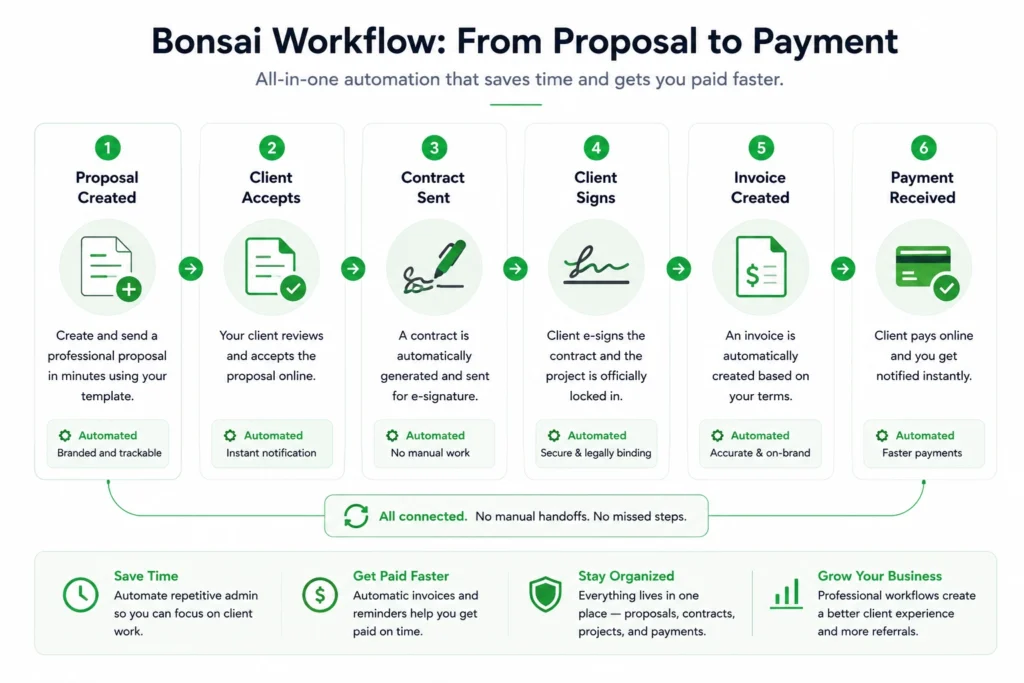
Create a proposal template for your most common service. Add your pricing structure, scope, timeline, and key deliverables.
Then connect it to your contract template, so when a client accepts the proposal, the contract goes out automatically with no manual action from you.
That two-step connection is what makes Bonsai worth using. The gap between a client saying yes and a signed contract drops from hours — sometimes days — to minutes. Proposals that sit open waiting for a manual follow-up lose momentum faster than most people realize.
Day 3: Configure your invoice workflow and payment reminders
Connect your bank account or Stripe. Set your standard payment terms. Turn on automatic reminders for overdue invoices.
Once active, Bonsai handles overdue invoice follow-ups without you. No more manually crafting a polite “just checking in on this” email. For freelancers who hate chasing payments — which is most freelancers — this single feature covers a lot of the monthly cost.
Week 2: Add your existing clients and active projects
Once your templates are working with one real client, import your existing clients and projects.
Don't do this before your templates are ready. Adding clients first means your first week looks like admin work instead of automated workflow, and you walk away thinking Bonsai is just another contacts app.
The 30-day audit: for both paths
After your first month with any client management tool, run through these questions before deciding whether to stay, upgrade, or switch:
- Which features do you open every single day without thinking about it?
- Which features did you turn on during setup and haven't touched since?
- Is there one task that still lives outside the tool that logically shouldn't?
- Are you spending more time managing the tool, or managing your clients?
Using 40 to 50% of the features consistently is a good outcome. Cut what you're not using, build on what's saving time, and only add complexity when a specific problem makes it necessary.
If one task still lives outside the tool and should be inside it, that's your next automation. One improvement per month makes a real difference by the end of the year. You don't need to solve everything in week one.
If the tool isn't reducing admin work after 30 days, it's probably a setup problem, not a product problem. Go back to the step where things started to break down. Many CRM failures trace back to a skipped email sync or a pipeline that was never connected to real deals.
Common setup mistakes and how to avoid them
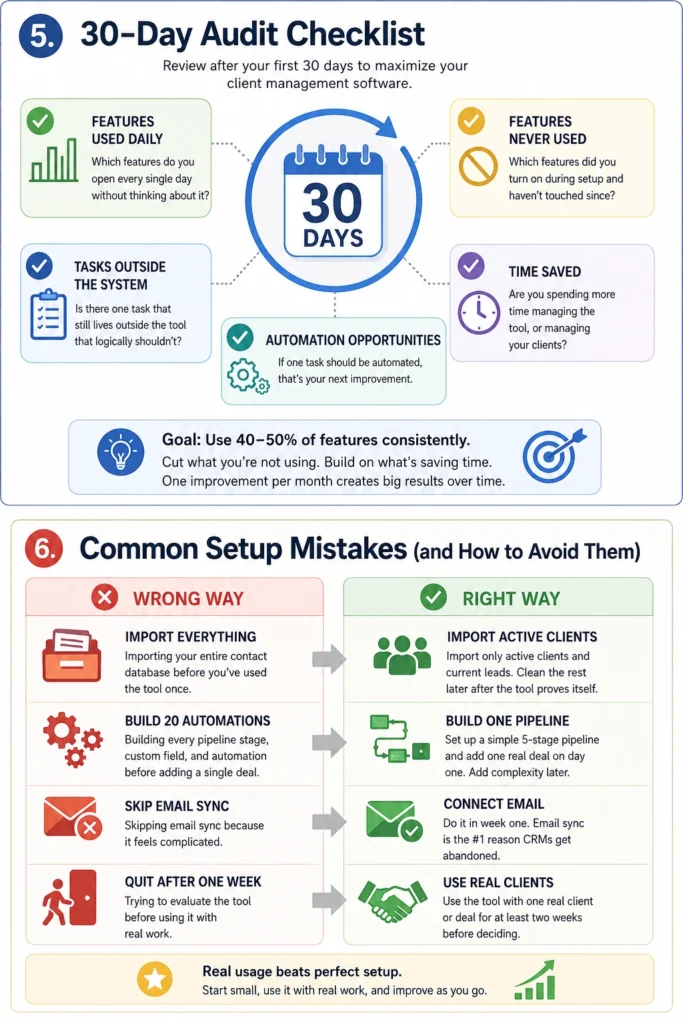
Importing your entire contact database before you've used the tool once.
Import only active clients and current leads. Clean the rest later, after the tool has proven itself in real work.
Building every pipeline stage, custom field, and automation before adding a single deal.
Set up the minimum viable pipeline — five stages at most — and add one real deal on day one. Complexity should come from actual usage, not from planning for every possible scenario.
Skipping email sync because it feels complicated.
Do it in week one, before you build any habits around the tool. A CRM without email sync is a CRM you'll stop using within 90 days.
For Bonsai users: adding clients before setting up templates.
Templates first. The automation that makes Bonsai worth the monthly cost only works once your proposal and contract templates are connected. Set up one complete template flow, test it with a real client, then import existing clients.
Trying to evaluate the tool before using it with real work.
Every tool looks clunky and abstract until you put a real client in it. Use it with one actual deal for two weeks before deciding whether it fits.
Back to the best client management software for small business for the full tool comparison and recommendations.