This is part of our guide to the best client management software for small business.
These are the questions that come up most often in freelance communities and after people read CRM comparison articles. The answers below are based on product research, feature comparisons, pricing analysis, and real-world workflows — not vendor marketing pages.
How we answered these questions
We looked at each tool from a small business perspective: setup difficulty, daily usability, pricing, workflow coverage, and whether it solves the problems freelancers actually face. Where claims are time-sensitive (pricing, product changes), we've noted what to verify before relying on the figures.
1. Is HubSpot really free for small businesses?
Yes, and it's worth understanding exactly what that means, because “free CRM” usually comes with a catch.
HubSpot's free plan is functional from day one, not a stripped-down trial with a countdown timer. You get contact management and core pipeline features at no cost, with no time limit and no credit card required. Verify current plan limits at hubspot.com, as HubSpot adjusts feature tiers periodically.
The limitations are real but specific. Some sales automation features, including email sequences, require a paid plan. HubSpot's Breeze AI is locked entirely behind paid tiers. And the jump from Starter to Professional is steep, which is why many small businesses stay on Free or Starter permanently and never need to go higher.
For most freelancers and small business owners starting out, the free plan covers what they need for the first year or two. The ceiling is high enough that it's not a reason to avoid starting there.
2. What is the easiest CRM to set up for a small business?
Less Annoying CRM and Bigin are the fastest, both functional within an hour of signup. Streak requires almost no onboarding if you already use Gmail, since it runs inside your existing inbox rather than as a separate app.
In our evaluation, Less Annoying CRM went from signup to a working pipeline with real contacts in under 20 minutes. Bigin took under an hour including contact import.
Zoho CRM was the slowest, requiring a full day or more to configure even the core features.
Setup estimates from our evaluation:
| Tool | Time to working pipeline |
| Less Annoying CRM | Under 20 minutes |
| Streak | Under 30 minutes (Gmail users) |
| Bigin by Zoho | Under 1 hour |
| HubSpot | 2 to 4 hours |
| Freshsales | 2 to 3 hours including email sync |
| Pipedrive | Half a day to a full day |
| Bonsai | 1 to 2 days for full template setup |
| Zoho CRM | Budget a full week |
If you've tried a CRM before and gave up because setup was overwhelming, start with Less Annoying CRM or Bigin.
3. How much does client management software cost for small businesses?
Legitimate client management software starts at $0/month. Paid plans range from around $7 to $60 per user per month depending on the tool and tier.
Free options:
- HubSpot Free: core CRM features, no time limit (verify current limits at hubspot.com)
- Bigin Free: 1 user
- Freshsales Free: up to 3 users, up to 1,000 contacts
Entry-level paid options:
- Bigin Express: ~$7/user/month
- Freshsales Growth: ~$9/user/month (annual) or ~$11/user/month (monthly)
- Bonsai Basic: ~$9/user/month
Mid-range:
- Less Annoying CRM: $15/user/month (one flat price, all features)
- Streak Solo: ~$15/month (1 user)
One cost most people overlook: if your CRM doesn't include proposals, contracts, or invoicing natively, you'll typically spend an additional $15 to $30/month on a separate tool like PandaDoc or DocuSign. That integration cost narrows the gap between a free CRM and an all-in-one platform faster than most people expect.
Verify all pricing at each vendor's site before purchasing. SaaS pricing changes often.
4. What CRM do freelancers commonly use?
HubSpot Free and Bonsai are among the most frequently recommended tools in freelance communities, based on discussions across those communities and common recommendations in 2026. HubSpot tends to come up for pipeline and follow-up management; Bonsai for proposals, contracts, and invoicing.
Among Gmail-first freelancers, Streak has a following specifically because it requires no context switching. Bigin is common among first-time CRM users who want something simple and affordable to start.
A pattern that comes up often: freelancers start with HubSpot Free for pipeline tracking and add Bonsai later when client admin becomes the bigger pain. Some start with Bonsai from day one if proposals and invoicing are the immediate problem.
5. Can I use Gmail as a CRM?
Yes. Streak turns Gmail into a functional pipeline and contact management system without requiring a separate app. Pipelines, contact records, email tracking, and task reminders all live inside Gmail as panels and sidebars.
Streak only works inside Gmail. If your team uses Outlook, or if you need to hand off context to someone on a different email client, that's a hard limit.
Streak also gets expensive for small teams. The free plan covers one user. The Pro plan runs around $49/user/month, though pricing varies by billing cycle and plan, so verify at streak.com before committing. For a team of two or three, the cost comparison with standalone CRMs shifts significantly. For solo operators, it remains one of the more practical options on the list.
6. Do I need both a CRM and a platform like Bonsai?
For most freelancers and solo service businesses, one tool is enough to start. The question is which problem is costing you more right now.
If leads and follow-ups are slipping, start with a CRM like HubSpot or Bigin. If proposals, contracts, and late payments are the bigger problem, start with Bonsai. Once the first problem is solved, add the second tool if the gap is still there.
If you're actively prospecting while managing a full client roster and both problems are already real, combining HubSpot Free with an entry-level Bonsai plan covers both workflows at a relatively low combined cost. That pairing (one tool for sales, one for delivery) is one of the more affordable ways to run a complete client operation. Starting with both from day one is a legitimate option when both problems are immediate. The setup time for each is low enough that running them in parallel is manageable.
7. What is the difference between a CRM and client management software?
A CRM focuses on finding and closing clients. Client management software focuses on serving them after they've signed.
More specifically: a CRM tracks leads, manages a sales pipeline, and automates follow-ups. Client management software handles what comes after: proposals, contracts, project delivery, invoicing, and ongoing client communication.
Most articles use these terms interchangeably, which is the root cause of the most common mistake in this category. A freelancer reads “best CRM for small business,” buys HubSpot or Pipedrive, and discovers six months later that neither tool sends proposals or collects payments. They weren't wrong about what they bought. They bought the wrong type of tool for the problem they actually had.
Short version: if your problem is closing clients, you need a CRM. If your problem is serving them after they've signed, you need an all-in-one platform. If both are problems, pick whichever is costing you more right now and solve that first.
8. Is Bonsai still a good choice after the Zoom acquisition?
As of June 2026, the acquisition does not appear to have changed Bonsai's core freelancer workflow positioning. The platform is still focused on proposals, contracts, invoicing, and time tracking for solo operators and small service businesses.
The honest caveat: acquisitions do change product direction over time, sometimes quickly and sometimes years later. The main things to watch are pricing changes, feature shifts, and long-term product roadmap updates from the Zoom integration. If you're building your client delivery workflow around Bonsai, it's worth checking in on their product announcements over the next 12 to 18 months.
For now, it's not a reason to avoid the platform.
9. How long does it take to set up client management software?
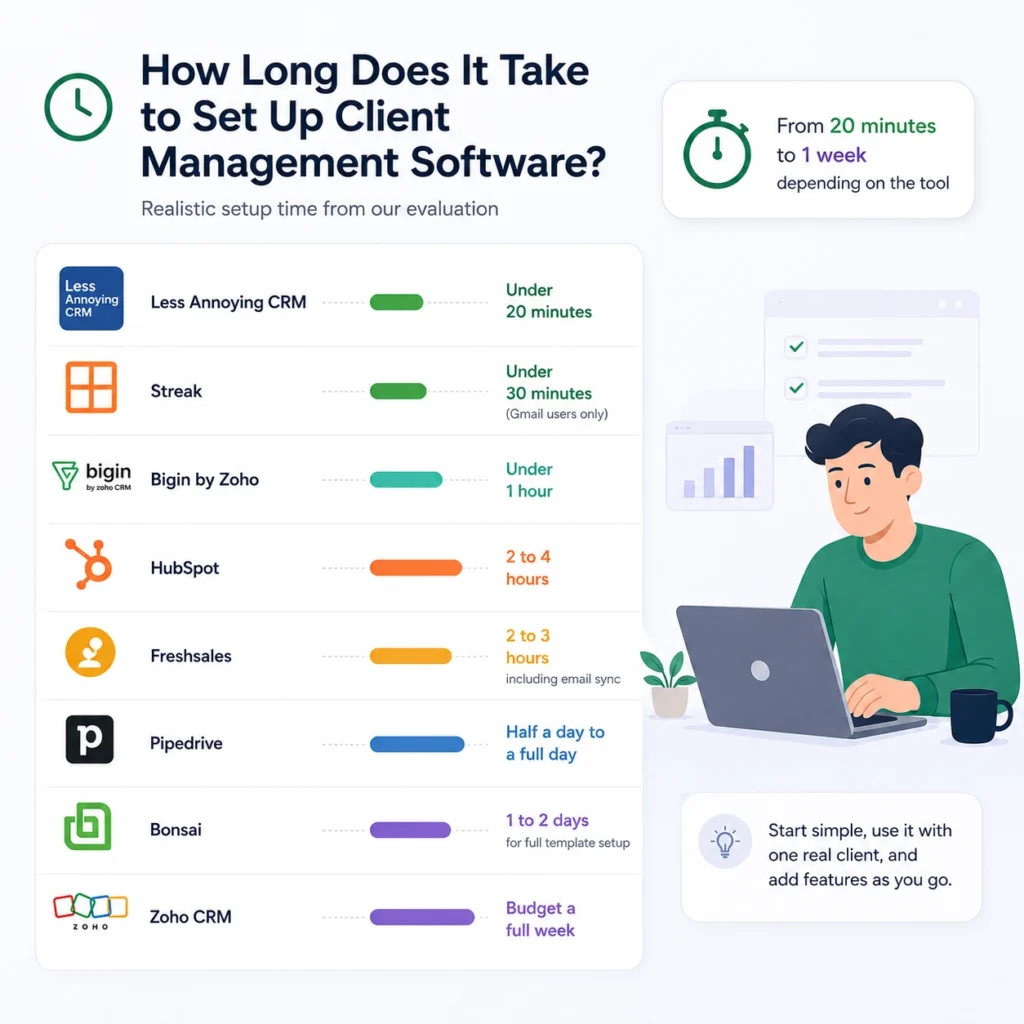
It depends on the tool and how much you try to configure before using it with a real client.
The most common setup mistake: trying to build the perfect system before putting a real deal into it. Most people spend several days configuring everything, then abandon the tool within a month because it never connected to real work. The better approach is to get the minimum viable version running, use it with one actual client, and add features based on what you genuinely need.
Realistic estimates from our evaluation:
| Tool | Realistic setup time |
| Less Annoying CRM | Under 20 minutes to a working pipeline |
| Streak | Under 30 minutes (Gmail users only) |
| Bigin | Under 1 hour including contact import |
| HubSpot | 2 to 4 hours for a properly configured free setup |
| Freshsales | 2 to 3 hours including email sync |
| Pipedrive | Half a day to a full day depending on pipeline complexity |
| Bonsai | 1 to 2 days to configure proposal, contract, and invoice templates |
| Zoho CRM | Budget a full week; don't try to configure everything at once |
A note on Bonsai: the 1 to 2 day estimate is for setting up templates properly. Once that's done, day-to-day use is faster than most CRMs on this list. The setup investment pays off quickly.
A note on Zoho CRM: if you're tech-comfortable and configure only what you need first, two to three days is achievable. The people who spend a week are usually the ones who tried to turn everything on at once.
Back to the best client management software for small business for the full comparison table and our final recommendations.