Confirm current pricing on each vendor's site before purchasing: SaaS pricing changes often. Some links in this article are affiliate links. Every tool listed here was independently evaluated before any affiliate relationship was considered.
This Toggl Track review covers what the tool does well, what each plan costs, and where its billing features stop. Toggl Track records your work hours and sorts them by client or project. It can also turn report data into a PDF invoice, but it does not replace a full accounting and payment system.
What you need from your time records decides which plan fits. If you only want to see where your hours go, the Free plan may be enough. If you want billable rates applied for you, more export formats, team reports or approval controls, a paid plan may make sense.
Product note: Toggl Track and the newer Toggl product are separate products. Prices, export rules, integrations and features can differ between them. This review covers Toggl Track only.
At a Glance: Is Toggl Track Worth It?
| Area | What you should know |
| Best fit | Freelancers, consultants and small teams that need clear time records |
| Main strength | Timer and manual time tracking, with client and project organization |
| Free plan | Core tracking and PDF exports, with limits |
| Paid plans | Billable rates, rounding, reports, exports and team controls |
| Invoicing | PDF invoices generated from reports |
| Main billing concern | Payment status and the wider accounting workflow need separate handling |
Toggl Track is worth a look when accurate time records are central to your work. It is a weaker fit as your only business tool if you also need recurring invoices, payments, expenses and financial records in one place.
What Toggl Track Does Well
Timer and Manual Time Entry
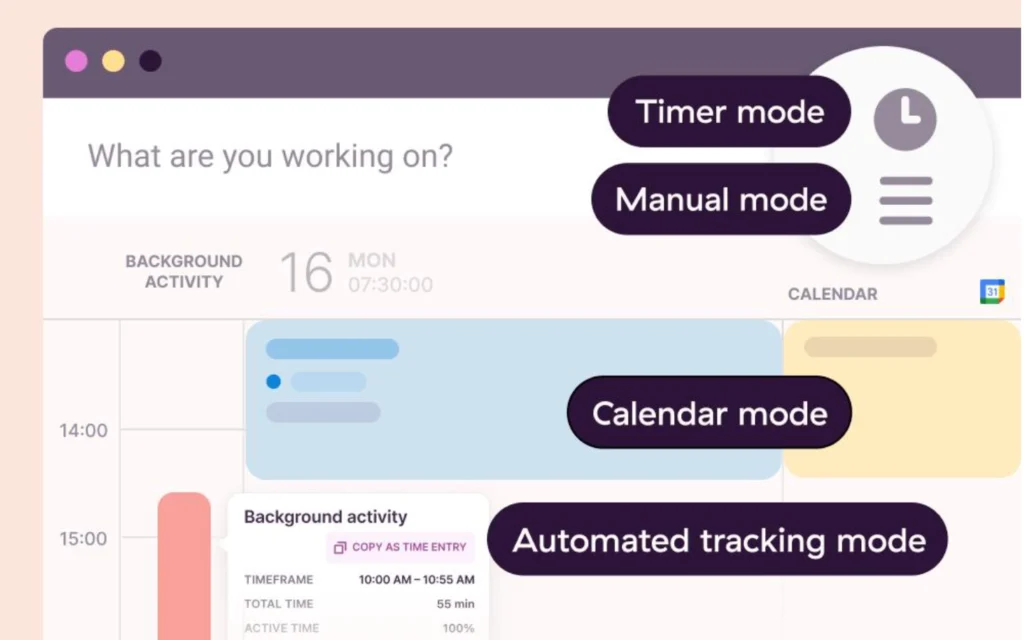
You can start and stop a timer as you work, then add or fix entries by hand when you need to. Web, desktop, mobile and browser-extension options give you several ways to record time.
That flexibility helps when you jump between client projects or forget to start the timer. You will still want to review your entries before you bill anyone.
Client and Project Organization
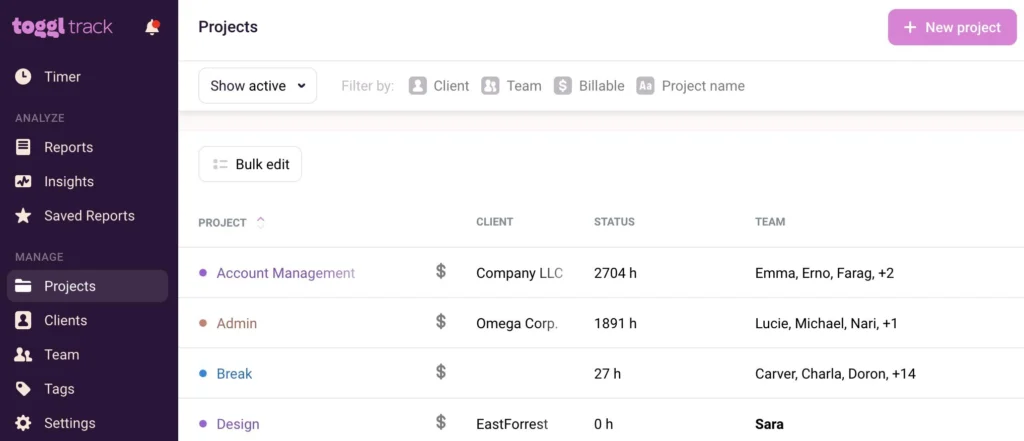
Projects, tasks and tags group related work and help you prepare reports for a billing period. A freelance writer, for example, might track research, writing, editing and client meetings under one project. The resulting report shows how the time was spent before the writer prepares an invoice.
Reports That Support Client Billing
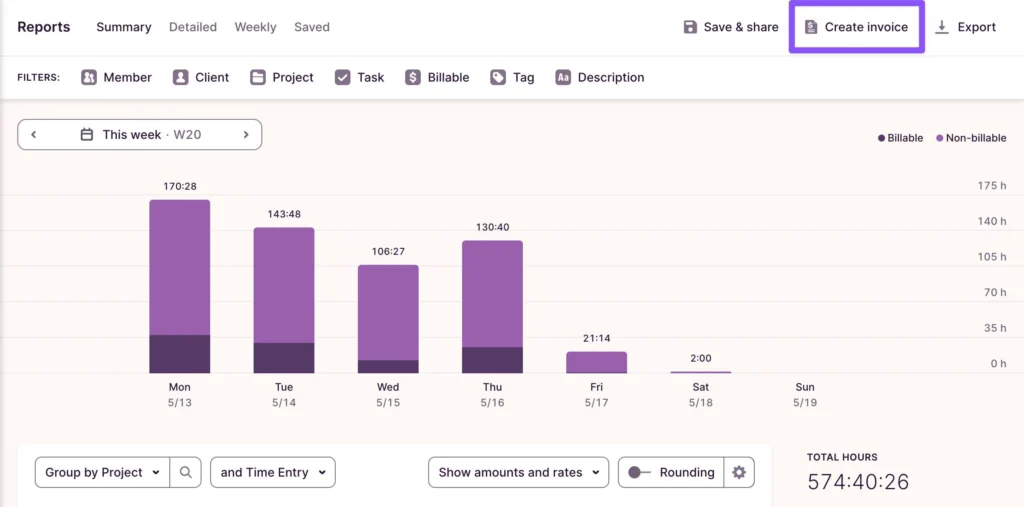
You can create a PDF invoice from a Summary or Detailed report. The Summary report groups work by project, while the Detailed report can list individual time entries. Toggl's official invoice-creation guide documents the process.
Optional Activity Tracking
Timeline and Autotracker can record application or website activity when you turn them on. They are opt-in, so you decide whether to use them.
The Track export guide says Timeline data covers the latest 90 days. It also explains that local activity data is saved for export only when the relevant desktop-app setting is enabled. If you prefer manual tracking, check these settings before you start.
Toggl Track Pricing and Free Plan Limits
Toggl's Track-specific support documentation lists the prices below. Check the price offered to your account before you subscribe, because billing details can change.
| Plan | Annual billing, per user/month | Monthly billing, per user/month |
| Free | $0 | $0 |
| Starter | $9 | $12 |
| Premium | $18 | $20 |
| Enterprise | Custom | Custom |
Find the pricing here: Toggl Track pricing.
What the Toggl Track Free Plan Includes
The Free plan covers core time tracking and PDF exports. According to Toggl's official export guide, CSV and other export formats need a paid Track plan.
The plan comparison also lists billable rates, rounding and advanced reporting as paid features. Check the current Toggle Track pricing before you choose a plan.
What a Paid Plan Adds
Starter is worth considering if you need billable rates, rounding, team reports, saved reports, project estimates or CSV exports. It also supports the documented QuickBooks invoice workflow.
Premium is aimed at teams that need tighter control over time records. That includes timesheet approvals, required fields, time audits, locked periods, historical billable rates, labor costs and profitability reporting. Confirm availability in the official Starter versus Premium guide.
Do not upgrade just because a feature exists. Upgrade when it solves a problem you actually have.
What Toggl Track Could Cost Your Team
These examples use the Track prices above. They assume USD, one license per person, no discounts, no add-ons and no taxes.
| Team size | Starter, annual total | Starter, monthly charge | Premium, annual total | Premium, monthly charge |
| 1 person | $108 | $12 | $216 | $20 |
| 3 people | $324 | $36 | $648 | $60 |
| 5 people | $540 | $60 | $1,080 | $100 |
| 10 people | $1,080 | $120 | $2,160 | $200 |
Annual totals assume a 12-month commitment at the annual rate. Monthly charges use the monthly rate for each license.
Review your licenses regularly. Toggl Track's license guide says removing a team member does not automatically remove their vacant license from the subscription. An unused paid license can keep costing money until an administrator removes it.
Toggl Track Billable Hours and Invoicing
Toggl Track can create invoices from your reports. Keep track of which billing jobs it handles and which may need another tool.
How the Timer-to-Invoice Workflow Works
- Create the client and project.
- Track your work with a timer or manual entry.
- Check that each entry has the right project, billable status and rate.
- Look for missing entries and fix mistakes.
- Filter the report by client, project and billing dates.
- Create an invoice from the Summary or Detailed report.
- Review the invoice fields and download the PDF.
- Store the invoice and payment records in a way that prevents repeat billing.
In Toggl, you create an invoice through Reports → Export → Create Invoice. A Summary report gives a shorter invoice grouped by project. A Detailed report adds a line for each time entry.
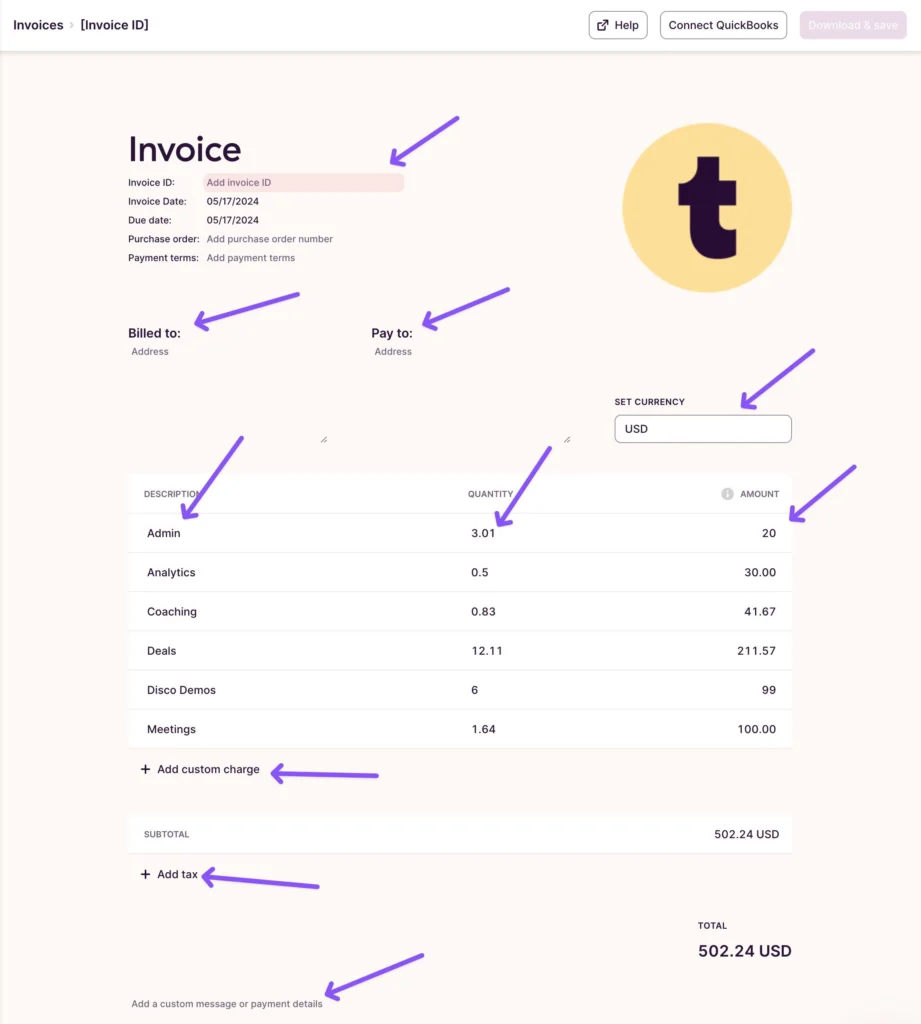
The invoice editor supports billing details, an invoice ID, a purchase-order number, tax, a memo and custom charges. You cannot change the layout, template or font, and edits do not carry over to your next invoice.
Can Toggl Track Manage Invoices?
The documentation has a gap here. The official invoice guide says that downloading an invoice saves a PDF to your browser's download location, and that generated invoices are not saved within Track. The same article also describes an Invoice page where you can view, download, duplicate and delete earlier invoices.
The guide also says there is no built-in way to mark time entries on an invoice as paid. It suggests adding a tag as a workaround.
In your own records, keep “invoiced” and “paid” separate. Tag work as invoiced once you send the invoice. Mark it paid only after the payment arrives. That helps you avoid billing the same time twice without confusing an unpaid invoice with a paid one.
The Track documentation reviewed here does not establish a complete workflow for recurring invoice schedules, expenses, receivables or payment reconciliation. If you rely on those, check the current product or use a dedicated invoicing or accounting tool. If you need a fuller setup, you can compare invoicing tools for your business.
Toggl Track and QuickBooks
Toggl Track documents a paid QuickBooks Online integration for Starter, Premium and Enterprise. Workspace administrators can send invoices to QuickBooks through the documented workflow.
One limit matters. The Track invoice and the QuickBooks invoice do not update each other. If you edit one, the other stays the same. Sending the same invoice twice can create a separate invoice in QuickBooks. Read the official QuickBooks integration guide before you rely on it.
Xero compatibility with your Track account needs separate verification. A legacy entry in the integrations directory does not guarantee support for your product version.
When Are Starter or Premium Worth Paying For?
Starter: When Manual Billing Becomes a Problem
Starter may suit you if you want the software to calculate billable amounts, apply rounding rules, export CSV data or build reports that support client billing.
A simple cost check can help. At the documented annual Starter rate, one license costs $108 a year. If you value an hour of administrative work at $50, that subscription equals about 2.2 hours of your time over the year.
This is a break-even example, not a promise that Starter will save you 2.2 hours. Judge for yourself whether its features would remove work or errors from your own process.
Premium: When Your Team Needs More Control
Premium matters more when your team needs timesheet approvals, required fields, locked periods, audit tools or profitability reporting.
These features can help a manager review records before reporting, or compare labor costs with project revenue. They matter less to a solo freelancer who only records hours and sends a basic invoice. Check the current feature list and your account price before you decide.
Integrations, Privacy, and User Experience
Integrations: Check the Exact Connection
Toggl advertises a large integrations directory, but not every listing is a current native integration for every Toggl product.
QuickBooks has a Track-specific guide. For other accounting tools, project-management systems or calendars, confirm the supported product, plan, data transfer and direction of sync.
The useful question is not whether an integration exists. It is whether it moves the information you need without creating extra work.
Privacy: Understand the Optional Features
Toggl's Track privacy policy explains that Timeline and Autotracker can record application and website activity when enabled.
Toggl states that Track does not take screenshots or record keystrokes, browsing history or location as part of its standard time-tracking approach. Read the policy before you turn on optional activity features, especially if your work involves confidential client information.
Toggl also reports SOC 2 Type II and ISO 27001 security credentials on its security page. Treat these as vendor statements, and review the available evidence against your own compliance needs.
What Users Say
The public feedback in the research gives a useful but limited picture.
In a freelancer's comparison of free time-tracking tools on Reddit, the author praised Toggl's interface, calendar view and ease of editing missed time entries. The same post criticized Free-plan reporting limits, described some mobile bugs and questioned whether paying for additional insights was worth it.
Other users, including reviewers on Capterra, report benefits from client and project organization. They also raise concerns about advanced reporting, timer behavior and cross-device syncing.
Where Toggl Track May Fall Short
Toggl Track may be the wrong fit when your workflow requires:
- A complete system for payment tracking and financial reconciliation.
- A confirmed recurring-invoice workflow.
- Expense management and full accounting records.
- Detailed reporting or export formats that your plan does not include.
- Team controls that require Premium.
- An integration that is legacy or unsupported for your exact product.
- A full project-management or payroll system rather than time tracking with project organization.
Toggl Track Review Alternatives
Pick an alternative based on the job you need the software to do. The vendor pricing pages below are good starting points. Confirm the plan that fits your account before you subscribe.
Harvest: For Invoicing and Expenses
Harvest is worth comparing when you want time tracking, invoicing and expense tracking in one workflow. Its current pricing page lists a Free plan for one seat and two projects, with invoicing and expenses included, and a Teams plan for larger needs. See Harvest pricing.
Clockify: For Free Team Time Tracking
Clockify is worth evaluating if you want a free plan for a small group. Its current pricing page lists Free for up to five users, with time tracking and reports. Check the Clockify pricing page to compare the features you need, not just the number of users.
Everhour: For Budgeting and Project-Tool Workflows
Everhour may suit teams that want time tracking alongside project budgets and invoicing. Its current pricing page lists a Free plan for up to five seats with limited features. The Team plan includes invoicing, budgeting and integrations, and has a five-seat minimum. See Everhour pricing.
Hubstaff: When Monitoring Is Part of the Job
Hubstaff serves a different use case. Its current plans include activity-monitoring features such as app and URL tracking, with screenshot allowances that depend on the plan. Compare Hubstaff pricing if your business needs these controls. If privacy-conscious time tracking is your priority, first decide whether that kind of monitoring fits your working relationship and requirements.
Who Should Choose Toggl Track?
Freelancers may find Toggl Track useful when they need straightforward time records, client reports and report-based PDF invoices.
Consultants may benefit from Starter when they need billable rates, rounding and more flexible exports.
Small teams should weigh their reporting and approval needs against per-license costs, then review their license count regularly.
Agencies should verify the invoice and accounting workflow before treating Track as the main billing tool.
Choose another tool when you need a fully connected invoicing, expense, payment and accounting workflow that Track does not clearly document for your use case.
In short, pick the smallest plan that supports your real workflow, and verify any feature that affects client billing before you depend on it.